How to Make a Text-to-Speech Song in 2026: Complete Guide for Creators
Learn how to make a text-to-speech song with Soundverse AI tools in 2026.
How to Make a Text-to-Speech Song
Creating music in 2026 has evolved beyond imagination. Musicians and content creators no longer need extensive vocal setups or studio time to bring songs to life. Thanks to advancements in AI music creation, technology now enables the creation of complete songs using text-to-speech systems. This article will guide you step-by-step on how to make a text-to-speech song, helping you transform written lyrics into a fully produced piece with AI vocals and instrumental support.
Why Are Text-to-Speech Songs Trending in 2026?
Since 2024 and 2025, we’ve seen rapid growth in voice synthesis and AI song generation. In 2026, creators now use AI voice engines and smart composition tools to express musical ideas instantly. Whether you’re producing demo vocals, experimenting with multilingual compositions, or crafting viral social clips, text-to-speech songs are the perfect solution. The accessibility of intelligent sound generation platforms—like Soundverse—has made music creation both faster and more creative.
AI songs are not just novelty projects anymore. They're redefining content workflows for YouTube creators, podcasters, and independent producers. The ability to create AI vocals and adapt them across languages and styles has helped globalize digital music culture.
How to Make a Text-to-Speech Song with Soundverse AI Song Generator

Soundverse’s AI Song Generator is the most comprehensive tool for text-based music production in 2026. It transforms text or lyrical ideas into full songs, complete with AI vocals and instrumentals. It operates through a smart multi-stage pipeline covering lyric interpretation, melody generation, arrangement, and mixing—all optimized for creators seeking high-quality output.
Core Capabilities
- Describe Your Song Mode: Quickly generate a song from a text prompt or description, perfect for prototyping a vibe or theme.
- Custom Mode: Input specific lyrics and choose precise parameters, from tempo to vocal tone.
- Reference Audio Support: Upload a clip to guide the melody, singing style, or instrumental reference for better alignment.
- Quick Style Selection: Choose genres like Pop, EDM, Rock, Jazz, or even experimental fusions.
Primary Use Cases
This tool supports varied needs—songwriting, vocal demos, social media quick content, personalized musical messages, or creating multilingual versions (over 10 languages).
Step 1: Feature Overview

Access the AI Song Generator directly from Soundverse’s main menu. This hub gives you shortcuts to modes like Describe Your Song or Custom Mode depending on your creative goal. The interface makes it easy to start a new project by typing lyrics or uploading existing ones.
Step 2: Lyrics Input
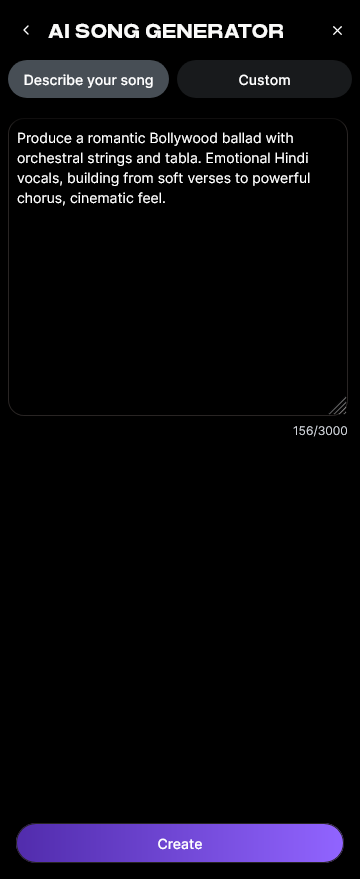
At this stage, you’ll add your written lyrics or text-based cues. You can also use AI Lyrics Writer, an integrated assistant that helps refine lyrical structure and tone. If you want inspiration, check out the internal guide on how to make good rap lyrics or explore genre-specific writing, such as How to Create Country Music with Soundverse AI.
Step 3: Style Selection

Choose your musical style and genre. Whether you’re leaning towards modern pop, ambient meditation, or an EDM banger, this selection tunes the generation algorithm for the desired feel. You can also read about genre shaping in Soundverse’s educational post, How to Create EDM with Soundverse AI.
Step 4: Configuration

Set up tonal properties such as tempo, vocal intensity, and arrangement preferences. Here, users can specify the language or voice type. If you're using reference audio, upload either a singing snippet or backing track for AI to match stylistically.
Step 5: Generation

Initiate the creation process. The AI operates asynchronously—meaning it processes your inputs behind the scenes instead of in real-time. Once the generation is complete, you’ll receive your produced song with AI vocals and instrumental backing.
Step 6: Generation Complete

Your final project is ready for review. The results include mixed vocals and balanced instrument layers. You can use Soundverse’s ecosystem to iterate on elements like arrangement or stems. Learn more about stems in What Are Song Stems and Why Do You Need Them. For a deeper dive, watch our guide on creating Deep House music or explore the Soundverse Tutorial Series - How to Make Music.
Step 7: Export Results

Download your AI-generated song in multiple formats (MP3, WAV). You can now use it as demo content or distribute it across social channels. Soundverse ensures your creation is ready for sharing without complex mastering.
Pro Tips for Creating the Perfect Text-to-Speech Song
- Experiment with tone and genre: Combine upbeat EDM rhythm with cinematic vocals to craft hybrid sounds.
- Use multilingual capabilities: Reach new audiences by generating vocals in different languages.
- Start short: A one-minute sample helps test the voice’s emotional expressiveness before producing a full track.
- Leverage reference audio: If you admire specific melodies or vocal patterns, upload them. This enhances accuracy in AI interpretation.
- Iterate creatively: Try variations with distinct vibes using Soundverse presets like Dreamy Pop or Deep House.
Why Musicians and Creators Love Text-to-Speech Songs
In 2026, the speed of creation is crucial for digital creators. AI song generators handle music ideation and production in minutes. Artists love this workflow because it unlocks freedom to experiment without technical barriers. Whether designing intros for podcasts or crafting original tracks for NFTs and video platforms, AI music creation has democratized production quality.
Soundverse particularly stands out among similar solutions. If you want to compare available tools, check Mubert alternatives or see why Soundverse is considered the best Soundraw alternative for professional-grade song generation.
The Future of Text-to-Speech Music Creation
By 2026, vocal synthesis models simulate authentic emotional expression indistinguishable from real voices. Innovations in sentiment-aware scoring help AI engines interpret lyrical mood dynamically, thus producing emotionally resonant outputs. For creators, this means they can express themselves across virtual personas, genres, and languages—all powered by text.
The growth of AI-driven creativity also encourages ethical and copyright-safe production ecosystems. Read about these trends in How AI-Generated Music Is Transforming the Music Industry.
Turn Your Text Into a Catchy Song Today!
Transform written words into music with Soundverse’s AI-powered tools. Generate professional-quality text-to-speech songs instantly and unleash your creative potential without needing studio skills.
Create Your Text-to-Speech Song
Related Articles
- Generate AI Music with Soundverse Text-to-Music — Learn how to transform your ideas into fully produced songs using Soundverse’s advanced text-to-music technology.
- Soundverse AI Revolutionizing Music Creation for New Age Content Creators — Discover how Soundverse is empowering creators with next-gen AI tools to produce music effortlessly and professionally.
- Best AI Music Generator: Top Picks and Review — Compare leading AI music generators and find out why Soundverse stands out for creativity, control, and quality.
- How to Make AI-Generated Music — Step into the future of music creation with this detailed guide on producing original songs using AI-powered platforms.
Here's how to make AI Music with Soundverse
Video Guide

Here’s another long walkthrough of how to use Soundverse AI.
Text Guide
- To know more about AI Magic Tools, check here.
- To know more about Soundverse Assistant, check here.
- To know more about Arrangement Studio, check here.
Soundverse is an AI Assistant that allows content creators and music makers to create original content in a flash using Generative AI.
With the help of Soundverse Assistant and AI Magic Tools, our users get an unfair advantage over other creators to create audio and music content quickly, easily and cheaply.
Soundverse Assistant is your ultimate music companion. You simply speak to the assistant to get your stuff done. The more you speak to it, the more it starts understanding you and your goals.
AI Magic Tools help convert your creative dreams into tangible music and audio. Use AI Magic Tools such as text to music, stem separation, or lyrics generation to realise your content dreams faster.
Soundverse is here to take music production to the next level. We're not just a digital audio workstation (DAW) competing with Ableton or Logic, we're building a completely new paradigm of easy and conversational content creation.
TikTok: https://www.tiktok.com/@soundverse.ai
Twitter: https://twitter.com/soundverse_ai
Instagram: https://www.instagram.com/soundverse.ai
LinkedIn: https://www.linkedin.com/company/soundverseai
Youtube: https://www.youtube.com/@SoundverseAI
Facebook: https://www.facebook.com/profile.php?id=100095674445607
Join Soundverse for Free and make Viral AI Music

We are constantly building more product experiences. Keep checking our Blog to stay updated about them!