How to Make a Song with AI for Free in 2026
Learn how to create music with AI free using Soundverse’s AI Song Generator. Step-by-step tutorial for beginners in 2026.
How to Make a Song with AI for Free
If you’ve ever dreamed of producing your own music but felt overwhelmed by technical barriers, 2026 is the perfect year to start. AI-powered tools now make it possible to create music with AI free – turning anyone with an idea into a producer, songwriter, or vocalist. In this guide, you’ll learn exactly how to make a full song using free AI songwriting tools, from writing lyrics to generating professional vocals and instruments.
Why Creating Music with AI for Free Is Easier Than Ever in 2026
Since 2024, artificial intelligence has reshaped the creative industry. By 2026, tools like Soundverse have become central to how musicians and creators compose music, experiment with genres, and build demos. Unlike traditional DAWs (Digital Audio Workstations), AI music creation software now handles much of the complex work—song structure, instrument arrangement, mixing, and even vocal performance—automatically.
Aspiring musicians, YouTubers, and social media creators can now make their own song with AI without purchasing expensive production software or hiring session musicians. This democratization of music production is one of the most exciting creative revolutions of the decade.
How to Make a Song with Soundverse AI Song Generator

Soundverse’s AI Song Generator is the main tool you’ll use for this process. It transforms plain text into fully arranged songs with AI-generated vocals and instrumental accompaniment. Let’s look at what it offers before diving into the step-by-step guide.
The Core Capabilities of Soundverse AI Song Generator
Soundverse’s AI Song Generator features a multi-stage pipeline that processes lyrics, melody, arrangement, and mixing. You can start in two main modes:
- Describe Your Song mode: Just type what you want – for example, “an upbeat pop track about chasing dreams” – and Soundverse interprets your prompt into lyrics, melody, and arrangement.
- Custom mode: If you already have lyrics or song ideas, you can upload them and customize generation settings.
- Reference Audio Support: Upload a voice recording, humming melody, or music clip for guidance.
- Quick Style Selection: Pick from genres like Pop, EDM, Rock, Jazz, Country, and more.
The generator is perfect for songwriting demos, vocal prototyping, social media content, custom greetings, and multilingual music creation in more than 10 languages.
Now, let’s follow the official workflow to create your own AI-generated song for free.
Step 1: Feature Overview

First, access the AI Song Generator from the main menu at Soundverse. You’ll see an intuitive dashboard where all the audio generation tools are displayed, including the AI Lyrics Writer and AI Singing Generator. Choose AI Song Generator to start building a complete track. For a deeper dive, watch our guide on creating Deep House music.
Step 2: Lyrics Input
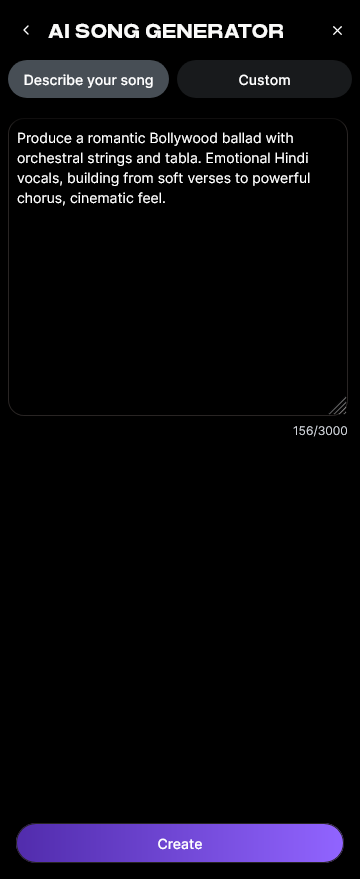
Enter or paste your lyrics into the text field. If you don’t have lyrics yet, click “Help Me Write” to use the integrated AI Lyrics Writer, which instantly creates structured verses and choruses based on your theme, tone, and genre. For ideas, check out Soundverse’s lyric inspiration guide at https://www.soundverse.ai/blog/article/how-to-make-good-rap-lyrics.
Step 3: Style Selection

Here you’ll select your genre. Soundverse allows you to choose from multiple styles such as Pop, EDM, Rock, Country, Lo-Fi, or Jazz. Each choice tailors the instrumentation and mood. For example, Pop adds bright synth layers, while Rock includes real drum and guitar emulations. Read more about genre trends at https://www.soundverse.ai/blog/article/most-popular-music-genres.
Step 4: Configuration

This is where you fine-tune generation parameters. You can adjust tempo, vocal style, intensity, or instrument density. The configuration section ensures your song matches your creative vision. You can also choose multilingual options if you’d like to generate lyrics and vocals in different languages.
Step 5: Generation

Click “Generate.” Soundverse processes your input through its multi-stage pipeline—constructing melody from text, arranging instruments, and layering vocals. The system works asynchronously, meaning it analyzes first and produces a finished file rather than offering real-time playback. Check out the Soundverse Tutorial Series - 9. How to Make Music for a detailed visual walkthrough.
Step 6: Generation Complete

Once processing is done, your fully produced song will appear in the results section. You can listen, refine prompts, or re-generate with different styles. Soundverse’s asynchronous production ensures consistent quality mixing and mastering automatically.
Step 7: Export Results

After reviewing, download your completed track in various formats—MP3, WAV, or stem-separated files. You can use these exports for YouTube videos, podcast intros, or social media posts. To learn about stem manipulation, read https://www.soundverse.ai/blog/article/soundverse-introduces-stem-separation-ai-magic-tool. Also explore our Soundverse Tutorial Series - 8. "Explore" Tab to understand project management and track organization.
What Are the Best Free AI Songwriting Tools to Combine with Soundverse?
In 2026, there’s a full ecosystem of AI music generators complementing Soundverse’s workflow.
- Soundverse AI Lyrics Writer: For fast, structured songwriting ideas based on story prompts.
- Soundverse AI Singing Generator: Generate solo acapella performances from lyrics—perfect for vocal experimentation.
- Soundverse AI Music Generator: For creating instrumental-only tracks, loops, or soundscapes. Learn more at https://www.soundverse.ai/blog/article/generate-ai-music-with-soundverse-text-to-music.
Other free tools include Mubert, Soundraw, and Udio. Each has strengths, but Soundverse stands out for combining lyrics, vocals, and instrumental generation within a single intelligent system. According to Curious Refuge, Suno ranks among the best AI Music Tools in 2026 for its excellent audio quality and free credit options, showing how the ecosystem continues to expand for creators.
Pro Tips for Using Free AI Music Tools Effectively
To make your AI song sound professional:
- Combine multiple modes—use “Custom” for detailed lyrics and “Describe Your Song” for experimentation.
- Choose genres aligned with your theme for emotional consistency.
- Experiment with tempo and language to explore international music styles.
- Layer results from the AI Music Generator and AI Singing Generator for custom blends.
- Use exported stems to remix or enhance tracks in traditional DAWs if needed.
Why AI Music Creation Matters for Content Creators in 2026
AI tools have become essential for creators across platforms—YouTube, TikTok, podcasts, and game development. In 2026, producing copyright-free background music is a necessity for avoiding licensing issues. The ability to create music with AI free means faster content turnaround and unique brand identity. Explore how AI music influences creators at https://www.soundverse.ai/blog/article/how-ai-generated-music-is-transforming-the-music-industry.
Start Creating Music with AI—Free and Effortless!
Transform your ideas into full tracks with Soundverse’s advanced AI music generator. No studio, no experience—just creativity powered by intelligent tools that make music creation easy and accessible for everyone.
Create Music Now
Related Articles
- Generate AI Music with Soundverse Text-to-Music — Discover how to instantly generate custom tracks using Soundverse’s powerful text-to-music tool.
- How to Make AI-Generated Music — Learn the step-by-step process for producing your own AI-driven songs using Soundverse’s intuitive platform.
- Soundverse AI Revolutionizing Music Creation for New-Age Content Creators — Explore how Soundverse is changing the way creators craft and publish music through cutting-edge AI technology.
- What AI Can Generate Songs — Find out which AI tools are leading the evolution in automated song creation and how they compare.
Here's how to make AI Music with Soundverse
Video Guide

Here’s another long walkthrough of how to use Soundverse AI.
Text Guide
- To know more about AI Magic Tools, check here.
- To know more about Soundverse Assistant, check here.
- To know more about Arrangement Studio, check here.
Soundverse is an AI Assistant that allows content creators and music makers to create original content in a flash using Generative AI.
With the help of Soundverse Assistant and AI Magic Tools, our users get an unfair advantage over other creators to create audio and music content quickly, easily and cheaply.
Soundverse Assistant is your ultimate music companion. You simply speak to the assistant to get your stuff done. The more you speak to it, the more it starts understanding you and your goals.
AI Magic Tools help convert your creative dreams into tangible music and audio. Use AI Magic Tools such as text to music, stem separation, or lyrics generation to realise your content dreams faster.
Soundverse is here to take music production to the next level. We're not just a digital audio workstation (DAW) competing with Ableton or Logic, we're building a completely new paradigm of easy and conversational content creation.
TikTok: https://www.tiktok.com/@soundverse.ai
Twitter: https://twitter.com/soundverse_ai
Instagram: https://www.instagram.com/soundverse.ai
LinkedIn: https://www.linkedin.com/company/soundverseai
Youtube: https://www.youtube.com/@SoundverseAI
Facebook: https://www.facebook.com/profile.php?id=100095674445607
Join Soundverse for Free and make Viral AI Music

We are constantly building more product experiences. Keep checking our Blog to stay updated about them!