How to Get AI to Sing a Song You Wrote
Learn how to make AI sing your song using modern vocal synthesis and song generation tools.
How to Get AI to Sing a Song You Wrote
In 2026, independent musicians and content creators are no longer limited by studio sessions, expensive vocalists, or complex production setups. Thanks to rapid advancements in AI song generation, you can now make artificial intelligence sing a song you wrote, complete with expressive vocals and instrumental backing. Whether you’re crafting a demo, producing content for YouTube, or creating multilingual tracks for your audience, AI-driven music creation tools make this process accessible to everyone.
Why musicians are turning to AI for singing their songs in 2026
AI-driven sound synthesis reached mainstream maturity in 2025. By 2026, creators are using tools like AI voice generators and song generation platforms that combine vocal synthesis, lyric alignment, and genre-based arrangement all in one place. This year’s independent artist community is increasingly merging songwriting talent with technology, enabling quick content production without sacrificing quality.
Musicians use AI song generation for multiple reasons:
- Speed – Create full demos within minutes.
- Accessibility – No need for costly vocalists or complex arrangement software.
- Experimentation – Test how your lyrics sound across different genres.
- Localization – Generate songs in over 10 languages for global audiences.
- Storytelling – Turn written stories, poems, or prompts into emotionally rich musical experiences.
What exactly is AI song generation?

AI song generation refers to the process where artificial intelligence composes, arranges, and performs music from user input such as lyrics or descriptive text. These systems use advanced vocal synthesis models to emulate expressive singing voices and blend them seamlessly with AI-generated instrumentals.
Unlike early AI music tools of 2024, modern platforms in 2026 use multi-stage generation pipelines involving melody prediction, harmony creation, arrangement layering, and mixing. This technology no longer produces robotic outputs—it can handle genre-specific phrasing and dynamic performance nuances typical of real singers.
How does vocal synthesis enable AI to sing?
Vocal synthesis is the science behind AI singing voices. Through deep learning, algorithms analyze thousands of vocal performances to learn tone, breath patterns, vibrato, and emotional delivery. When applied to lyrics, the AI interprets syllables, rhythm placement, and phrasing to create a lifelike sung performance.
Some AI singing models even support experimental vocal textures such as whispering, humming, or stylized effects like cat sounds for novelty content creation. As of 2026, vocal synthesis tools integrated into music production platforms make it possible for songwriters to achieve professional-quality acapella tracks without needing human singers.
What tools can help you make AI sing your lyrics?
There are several types of AI music creation tools that support song generation workflows:
- AI Music Generators – Create instrumental backings or full compositions from text prompts.
- AI Voice Generators – Synthesize custom singing voices for performing your lyrics.
- Text-to-Music Systems – Interpret written descriptions to produce genre-based arrangements.
- AI Lyrics Writers – Offer lyric inspiration based on given moods or themes.
For creators interested in learning how generative audio intersects with modern music production, explore related resources like How AI-Generated Music Is Transforming the Music Industry and AI Music Generator and Human Composers: A Future Together. For a deeper dive, watch our guide on creating Deep House music.
How to prepare your lyrics for AI singing
Before using any system, ensure your lyrics are structured with verses, choruses, and bridges clearly marked. AI typically recognizes section boundaries better when you format text with line breaks or section headings.
You can fine-tune lyrics by considering syllable counts within phrases and maintaining rhythmic consistency. These factors help the AI align melody with lyrical flow correctly.
For those needing text refinement help, tools like the AI Lyrics Writer assist in generating structured song lyrics based on your tone and style. Once you’ve polished your lyrics, you can move forward with generation.
How to make AI sing your song (step-by-step guide)
Now that the fundamentals of AI song generation are clear, let's walk through how to get AI to sing a song you wrote.
Step 1: Feature Overview

Access the AI Song Generator from the main Soundverse menu. This tool lets you turn lyrics or descriptive prompts into complete songs with vocals and instrumental backing. It operates through a multi-stage pipeline that handles lyrics interpretation, melody formation, arrangement, and mixing.
Step 2: Lyrics Input
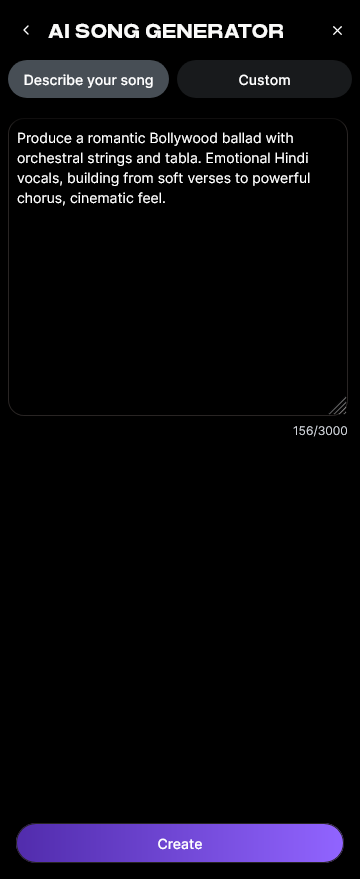
Enter or paste the lyrics you’ve written into the input field. You can use full song text or just a verse to test variations. If you don’t have lyrics yet, use the integrated 'Help Me Write' feature powered by the AI Lyrics Writer to auto-generate content.
Step 3: Style Selection

Choose your preferred music style or genre—pop, rock, EDM, jazz, classical, or experimental. Quick Style Selection helps the AI determine the arrangement structure and vocal effects that match your theme.
Step 4: Configuration

Set generation parameters such as tempo, vocal tone, and instrumental density. In Custom mode, you can upload reference audio for melody guidance or stylistic matching.
Step 5: Generation

Click “Generate.” The AI uses your input to create synchronized vocals and instrumentals. The process is asynchronous, meaning the model first processes your song before returning results—no live preview or real-time monitoring occurs.
Step 6: Generation Complete

Once processing is finished, the generated outputs are displayed in your dashboard. You can listen, evaluate, and, if necessary, refine your lyrics or style parameters to iterate further.
Step 7: Export Results

Export your completed song in multiple formats for sharing or further production use. Soundverse allows downloading stems or full mixes for post-editing.
How to make AI sing a song you wrote with Soundverse AI Song Generator

Soundverse’s AI Song Generator is built precisely for independent musicians seeking control and creativity. It supports two modes:
- Describe Your Song Mode: Generate music by providing a prompt or short description.
- Custom Mode: Input your lyrics and customize styles and settings.
Soundverse also offers Reference Audio Support, where you can upload samples for melody or vocal resemblance. Combined with Quick Style Selection, you can easily switch between genres like pop, EDM, or rock.
Key use cases include:
- Songwriting demos and vocal prototyping.
- Social media and YouTube content creation.
- Personalized musical gifts.
- Multilingual content generation (10+ languages).
It’s the ideal workflow for creators expanding their projects beyond traditional recording setups. For deeper AI music tutorials, check out guides such as How to Create Country Music with Soundverse AI or Generate AI Music with Soundverse Text-to-Music.
Pro tips for refining AI vocals
- Experiment with multiple genre styles—try one upbeat pop version and another ambient one.
- Upload short melody references to help the AI better interpret phrasing.
- If striving for emotional depth, adjust lyric pacing—AI responds well to concise verses.
- Use stem separation tools like Soundverse AI Magic Tool to isolate vocals or instrumentals for remixing.
- Always listen critically—AI music creation enhances creativity but still benefits from human shaping.
The future of AI-generated singing in 2026
By mid-2026, AI singing models are becoming indistinguishable from real vocalists in dynamic range and expressiveness. This evolution is driving new opportunities in film, gaming, and digital entertainment. Independent creators now compose and release tracks without traditional studio investment.
As seen in industry analyses such as Music Industry Trends, artificial intelligence is redefining music accessibility—bridging between technology and artistry.
Start Generating Your AI Songs Today
Bring your original lyrics to life with Soundverse's AI music generation tools. Compose, sing, and produce complete tracks effortlessly — all powered by intelligent sound algorithms.
- What AI Can Generate Songs — Discover which AI platforms are capable of turning your text or lyrics into fully produced songs.
- Generate AI Music with Soundverse Text-to-Music — Learn how to turn written prompts or ideas into immersive music using Soundverse’s text-to-music feature.
- Soundverse Assistant: Your AI Music Co-Producer — Explore how Soundverse Assistant helps you produce polished audio tracks with minimal effort.
- AI Ranks Soundverse’s AI Singer #1: The Ultimate AI Singing Platform Dominating 2025 — Find out how Soundverse’s AI singer technology is redefining the future of vocal performance.
Here's how to make AI Music with Soundverse
Video Guide

Here’s another long walkthrough of how to use Soundverse AI.
Text Guide
- To know more about AI Magic Tools, check here.
- To know more about Soundverse Assistant, check here.
- To know more about Arrangement Studio, check here.
Soundverse is an AI Assistant that allows content creators and music makers to create original content in a flash using Generative AI.
With the help of Soundverse Assistant and AI Magic Tools, our users get an unfair advantage over other creators to create audio and music content quickly, easily and cheaply.
Soundverse Assistant is your ultimate music companion. You simply speak to the assistant to get your stuff done. The more you speak to it, the more it starts understanding you and your goals.
AI Magic Tools help convert your creative dreams into tangible music and audio. Use AI Magic Tools such as text to music, stem separation, or lyrics generation to realise your content dreams faster.
Soundverse is here to take music production to the next level. We're not just a digital audio workstation (DAW) competing with Ableton or Logic, we're building a completely new paradigm of easy and conversational content creation.
TikTok: https://www.tiktok.com/@soundverse.ai Twitter: https://twitter.com/soundverse_ai Instagram: https://www.instagram.com/soundverse.ai LinkedIn: https://www.linkedin.com/company/soundverseai Youtube: https://www.youtube.com/@SoundverseAI Facebook: https://www.facebook.com/profile.php?id=100095674445607
Join Soundverse for Free and make Viral AI Music

We are constantly building more product experiences. Keep checking our Blog to stay updated about them!