How to Extend Songs: Techniques for Creating Longer Tracks
Learn how to extend songs using remix, loop, and arrangement techniques in 2026.
How to Extend Songs: Techniques for Creating Longer Tracks
In 2026, music producers, DJs, and sound designers have embraced new methods for creating longer, more immersive songs. Whether you want to fit a track to a specific video length or create an extended version for live sets, understanding how to extend songs effectively is a vital skill. This guide breaks down modern techniques, arrangement ideas, and remix processes, with a focus on AI-powered solutions like Soundverse.
Why Extend Songs in Modern Music Production?
Song length has always played a critical role in listener engagement, playlist strategy, and content synchronization. In 2026, extended mixes are once again trending, particularly on streaming platforms and social media short-form reels that demand flexibility in track duration. By mastering song length editing and extension, producers can meet both creative and technical demands.

What Are the Common Techniques to Extend Songs?
When learning how to extend songs, consider a blend of creative and technical methods that preserve musical integrity.
1. Looping Key Sections
Looping is one of the easiest and most effective remix and loop techniques. You can take a chorus or instrumental break and repeat it with subtle variations in rhythm or effects. This method works well for genres like deep house, trance, or ambient music.
2. Building Seamless Transitions
To avoid abrupt section repetition, use smooth fade-ins or crossfades. These transitions maintain flow between original and extended parts. Many audio editors also apply noise gates or compressors to make transitions more natural.
3. Layering New Elements
A longer track can benefit from gradual development — adding new percussion, harmony lines, or backing vocals keeps the listener engaged. You can introduce nuanced textures every few bars so the extension feels organic.
4. Extending with Bridge or Outro Sections
If your track feels complete but needs length for synchronization with a video or DJ set, consider adding a bridge or outro. These can provide emotional closure while lengthening the duration.
5. Stem Separation for Structural Remixing
Stem separation tools allow you to isolate drums, vocals, or basslines. Once separated, you can re-arrange or expand them. For example, Soundverse recently introduced AI stem tools that assist producers in creating new versions seamlessly.
6. Extend Instrumental Sections
Sometimes you don’t need to expand the full song — extending the instrumental portion before or after the vocals can create breathing space and emphasize musicality.
7. AI-Aided Generation
Modern tools like Soundverse and other AI music generators help automate the extension process. They learn the song’s tempo, key, and mood, then generate new parts that fit naturally.

How to Prepare for Extending a Song
Before you dive into song length editing, you need a clear structural roadmap.
- Analyze song structure. Identify intro, verse, chorus, bridge, and outro sections to locate potential expansion points. Soundverse’s Section Analysis feature automatically labels these points.
- Manage tempo and key. Keep extensions aligned with the original BPM and key signature to retain musical coherence.
- Decide on the purpose. Are you extending for a remix, soundtrack fit, or performance version? This will shape your approach.
- Use references. For creative inspiration, check genre-specific cases like creating EDM with AI or developing meditative music.
Advanced Remix and Loop Techniques for Longer Tracks
Beyond basic looping, professional producers in 2026 use hybrid remix workflows.
Reverse Echo Effects
Applying reverse delays or reverb toward the end of a repeated section helps bridge the original and extended parts.
Pitch and Formant Shifting
Minor pitch shifts introduce subtle movement and variation, useful when extending melodic loops.
Dynamic Automation
Automate filters, EQ sweeps, or reverb wetness to create a sense of evolving motion during longer instrumental sections.
Reharmonization
Changing the underlying chords under a repeated melody generates freshness. This technique works well for jazz or cinematic genres.
Creating Ambient Builds
For sound installations or game soundtracks, extended builds and evolving pads can stretch pieces beyond traditional time limits.
For a deeper dive, watch our guide on creating Deep House music or How to Make Music from the Soundverse Tutorial Series.
Practical Song Arrangement Ideas
Here are several song arrangement ideas tailored for music producers looking to extend music tracks effectively:
- Modular arrangement: Arrange your composition in interchangeable blocks to make expansion straightforward.
- Dynamic layering: Start minimal and add new sonic elements progressively, extending duration naturally.
- Delayed climax: Move the peak section further into the track to enhance development.
- Outro looping: Let the outro fade across a longer timeframe using gradual volume automation.
How to Make Longer Tracks Work Effectively in 2026
Trends in 2026 favor immersive listening experiences — extended lo-fi sessions, ambient radio mixes, and interactive game soundtracks. For creators, lengthening a song isn’t about repeating material; it’s about storytelling. Using AI-driven tools ensures the extended sections match the style and emotional contour of the original.
You can explore complementary methods such as AI music arrangement tools or learn how AI is transforming the music industry. These resources highlight how producers are shifting from manual editing to intelligent generation.
How to Make Extended Versions Instantly Using Soundverse Extend Music
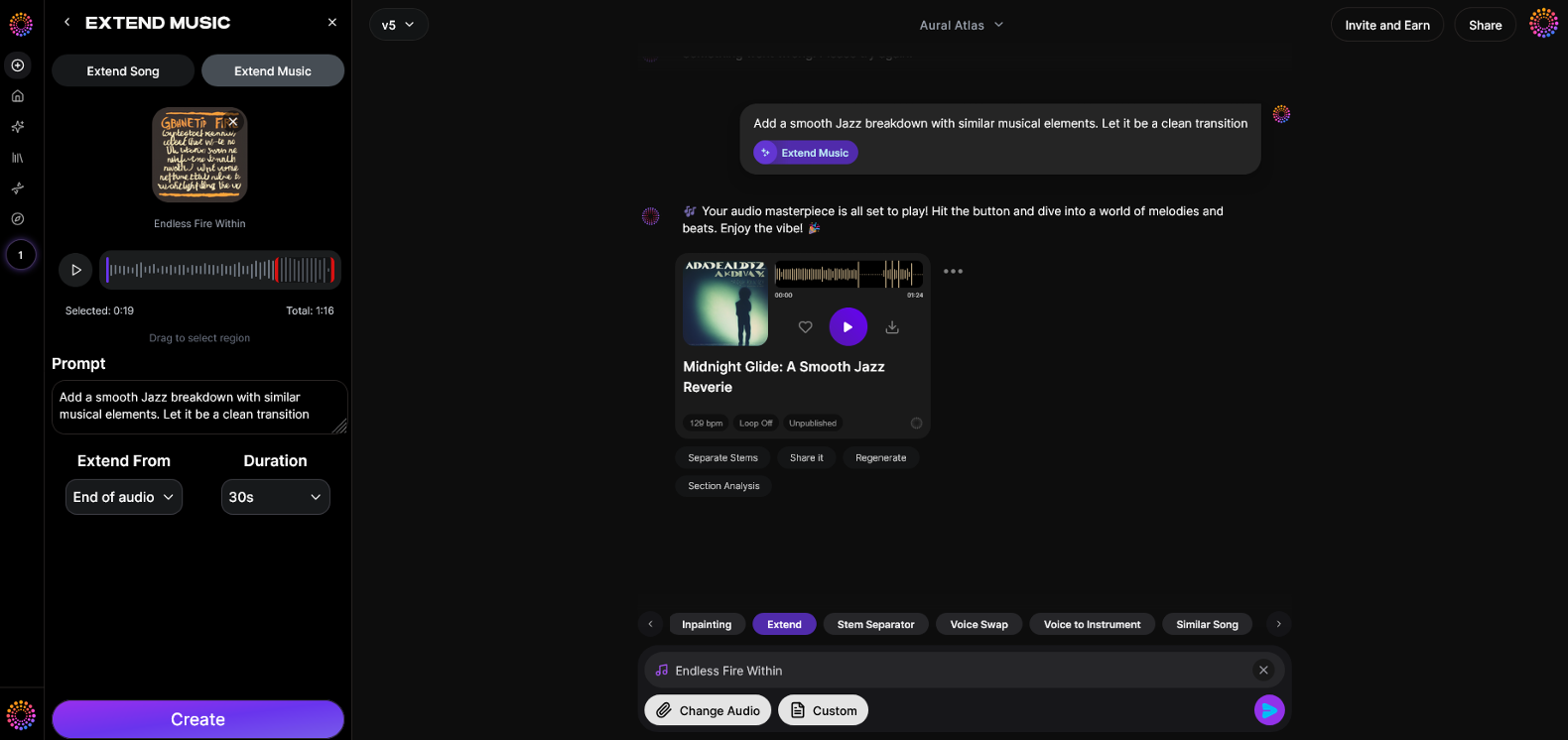
Now that you understand how to extend songs manually, you can achieve professional results instantly with Soundverse.
Soundverse’s Extend Music feature seamlessly lengthens existing tracks by generating new material that matches the style, tempo, and key of your original audio. It supports both instrumental extensions and full song continuations with vocals, allowing fine control over duration — from short 15-second length increases to full 3-minute expansions.
Step 1: Feature Overview
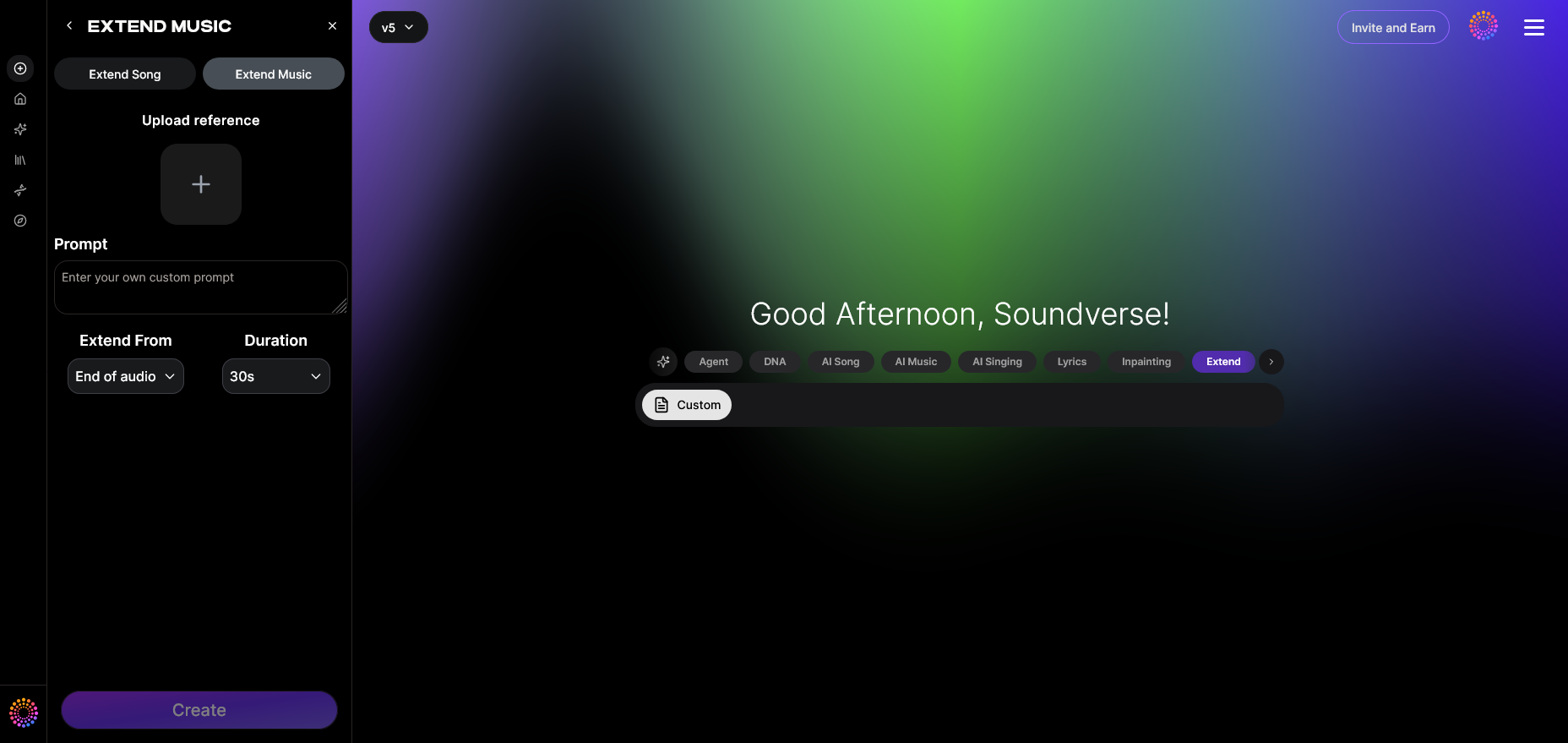
Access the Extend Music tool inside Soundverse. It is designed to handle both instrumental and vocal-based tracks.
Step 2: Upload Track
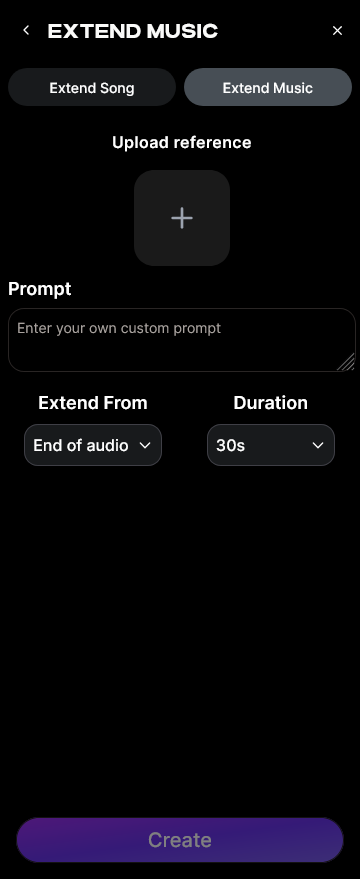
Upload your audio file of choice — whether an original composition or remix base. The AI studies its tempo and tonal characteristics to prepare for extension.
Step 3: Duration Setting
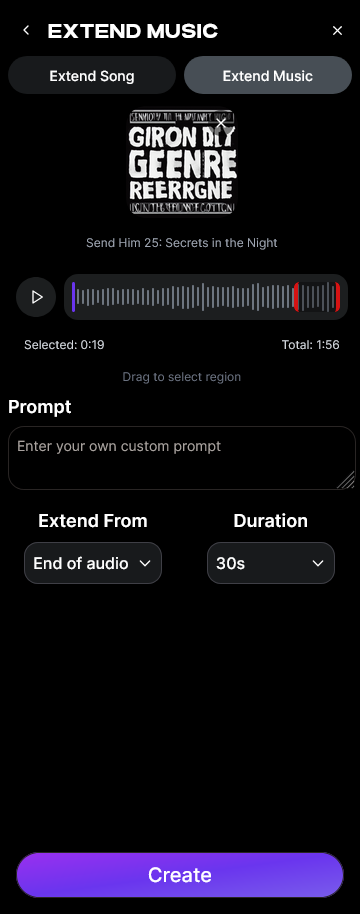
Select how long you want the extension to be. Soundverse offers flexible control from 15 seconds to 3 minutes added length.
Step 4: Generation
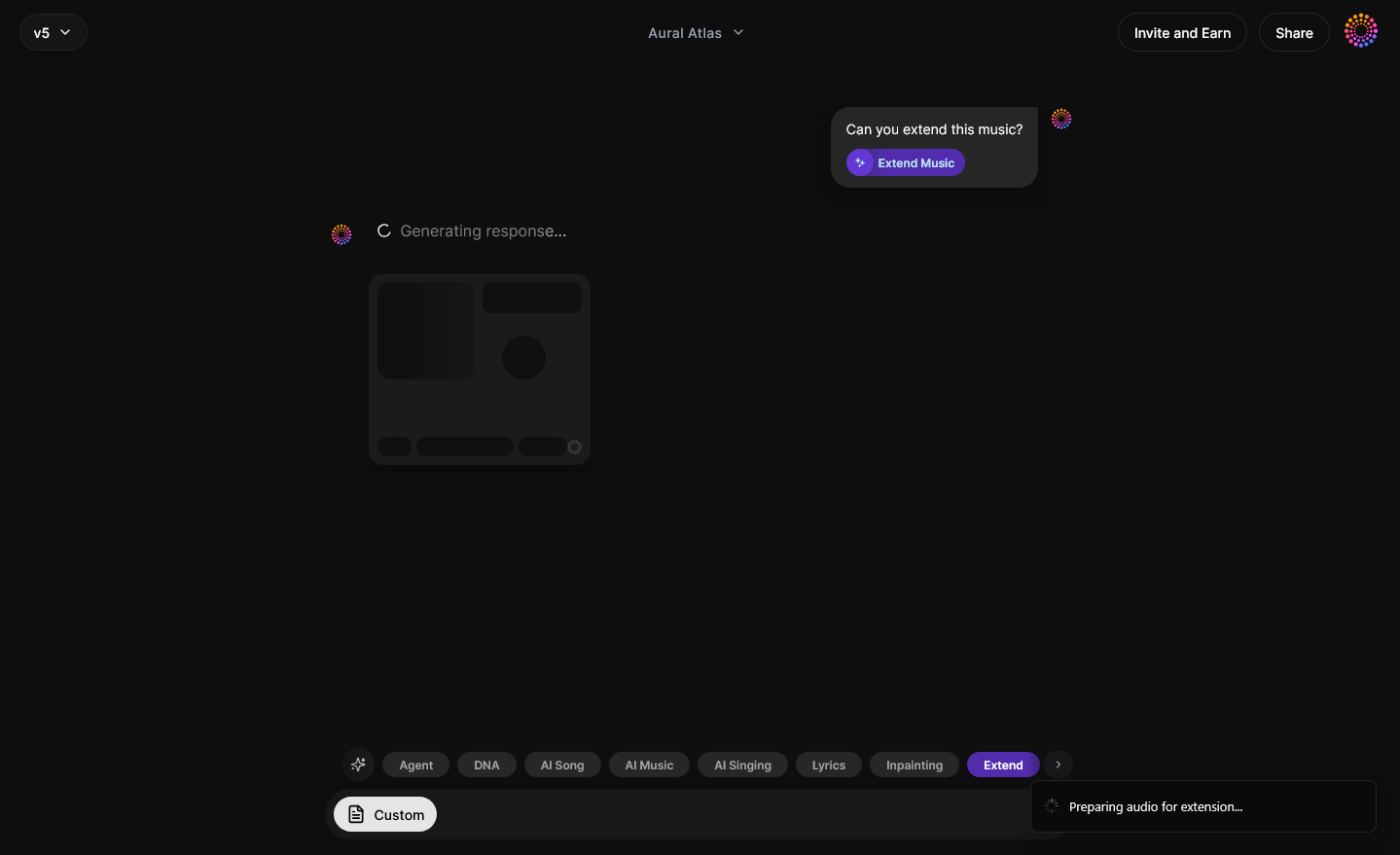
Once settings are confirmed, the AI processes your song asynchronously to create a seamless extension that sounds cohesive and natural.
Step 5: Download Extended
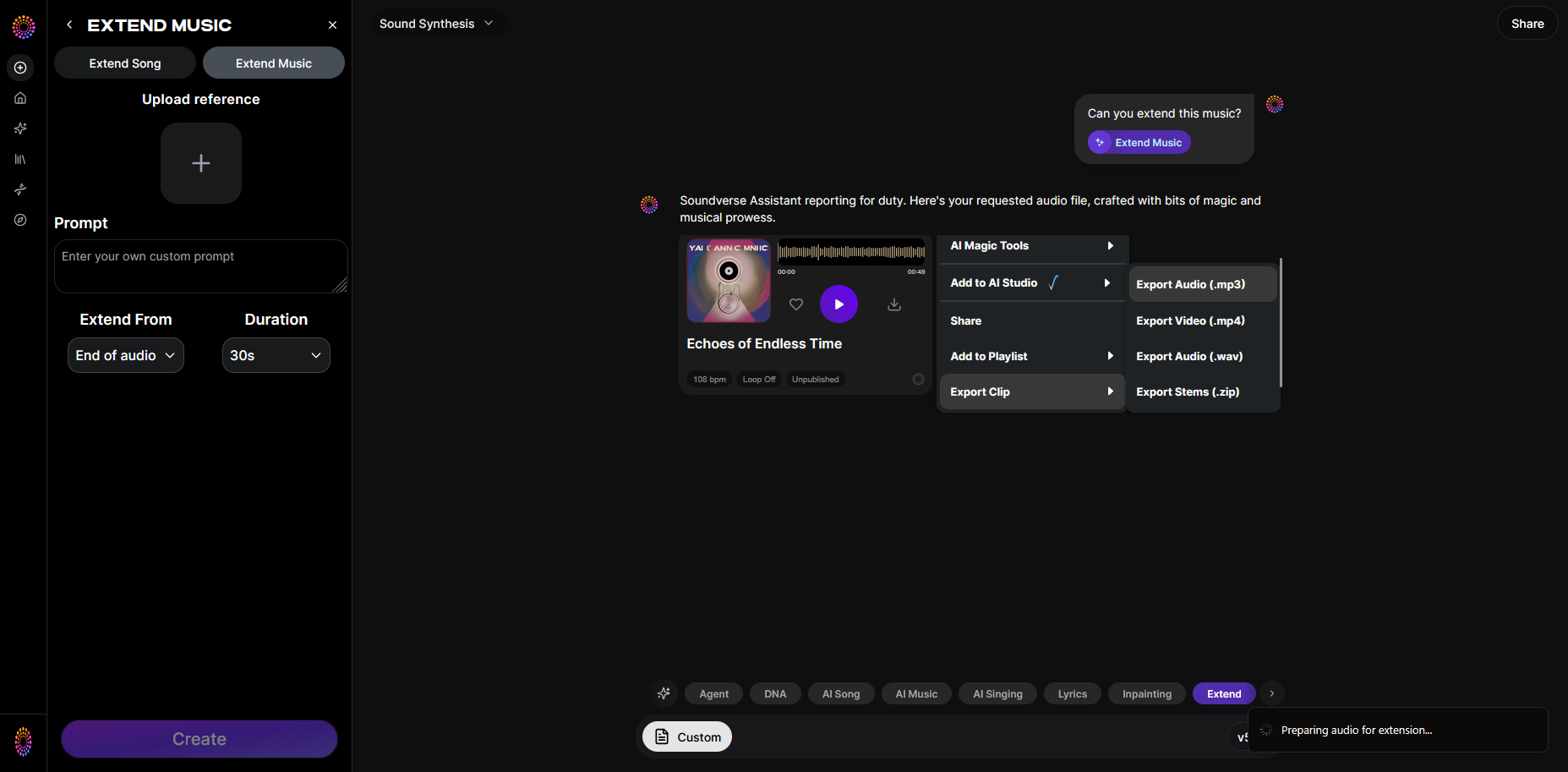
After the generation completes, download your extended audio track and integrate it into your DAW, performance set, or video project.
Beyond Extend Music, Soundverse offers Inpainting for precise editing and Section Analysis for automatic structure labeling. These complementary tools make rearranging and remixing effortless — perfect for fitting music to video projects or creating DJ edits.
Create Extended Tracks Instantly with Soundverse AI
Transform simple melodies into full-length compositions using intelligent AI tools that adapt your creative style. No more tedious edits—Soundverse helps you extend, refine, and perfect your songs effortlessly.
Start Creating with Soundverse
Related Articles
- Generate AI Music with Soundverse Text-to-Music: Discover how to transform your written ideas into fully produced tracks using Soundverse’s text-to-music generation technology.
- What Are Song Stems and Why Do You Need Them: Learn how separating stems can give you flexibility to remix and extend songs effortlessly using AI-powered tools.
- Soundverse Introduces Stem Separation AI Magic Tool: Explore how Soundverse’s stem separation feature helps creators manipulate tracks, layer sounds, and produce extended versions with ease.
- Soundverse Assistant: Your AI Music Co-Producer: Meet the AI assistant that helps you take your music to the next level—enhancing arrangements, extending tracks, and streamlining workflow.
Here's How to Make AI Music with Soundverse
Video Guide

Here’s another long walkthrough of how to use Soundverse AI.
Text Guide
- To know more about AI Magic Tools, check here.
- To know more about Soundverse Assistant, check here.
- To know more about Arrangement Studio, check here.
Soundverse is an AI Assistant that allows content creators and music makers to create original content in a flash using Generative AI. With the help of Soundverse Assistant and AI Magic Tools, our users get an unfair advantage over other creators to create audio and music content quickly, easily and cheaply. Soundverse Assistant is your ultimate music companion. You simply speak to the assistant to get your stuff done. The more you speak to it, the more it starts understanding you and your goals. AI Magic Tools help convert your creative dreams into tangible music and audio. Use AI Magic Tools such as text to music, stem separation, or lyrics generation to realise your content dreams faster. Soundverse is here to take music production to the next level. We're not just a digital audio workstation (DAW) competing with Ableton or Logic, we're building a completely new paradigm of easy and conversational content creation.
TikTok: https://www.tiktok.com/@soundverse.ai
Twitter: https://twitter.com/soundverse_ai
Instagram: https://www.instagram.com/soundverse.ai
LinkedIn: https://www.linkedin.com/company/soundverseai
YouTube: https://www.youtube.com/@SoundverseAI
Facebook: https://www.facebook.com/profile.php?id=100095674445607
Join Soundverse for Free and Make Viral AI Music

We are constantly building more product experiences. Keep checking our Blog to stay updated about them!