How to Extend a Beat
Extending a beat is one of the essential techniques that turn a short musical idea into a full track ready for release or performance. Whether you’re creating a remix, producing an extended mix for a DJ set, or simply giving your track more breathing space, understanding how to add bars, loops, and transitions while maintaining rhythm and flow is key.
How to Extend a Beat
Extending a beat is one of the essential techniques that turn a short musical idea into a full track ready for release or performance. Whether you’re creating a remix, producing an extended mix for a DJ set, or simply giving your track more breathing space, understanding how to add bars, loops, and transitions while maintaining rhythm and flow is key.
Understanding the Basics of Beat Extension
Extending beats generally includes techniques like looping, layering, adding fills, and sampling. These help you maintain energy while evolving the track naturally rather than sounding repetitive. As explained in The Ultimate Guide to Extending Beats, these strategies form the backbone of most producers’ workflows.

If you’re using DAWs like FL Studio, Ableton, or Soundverse Arrangement Studio, you can easily experiment with multiple sections by copying and manipulating audio clips. Producers often double the verse structure, reinforce pre-choruses with extra percussion, or use automation to smoothly ramp up energy before a drop.
For those wanting a visual guide, watch our Soundverse Tutorial Series - 9. How to Make Music. This walkthrough demonstrates how foundational beat structures can be expanded with intelligent arrangement changes.
Step-by-Step: Using AI Tools to Extend Beats
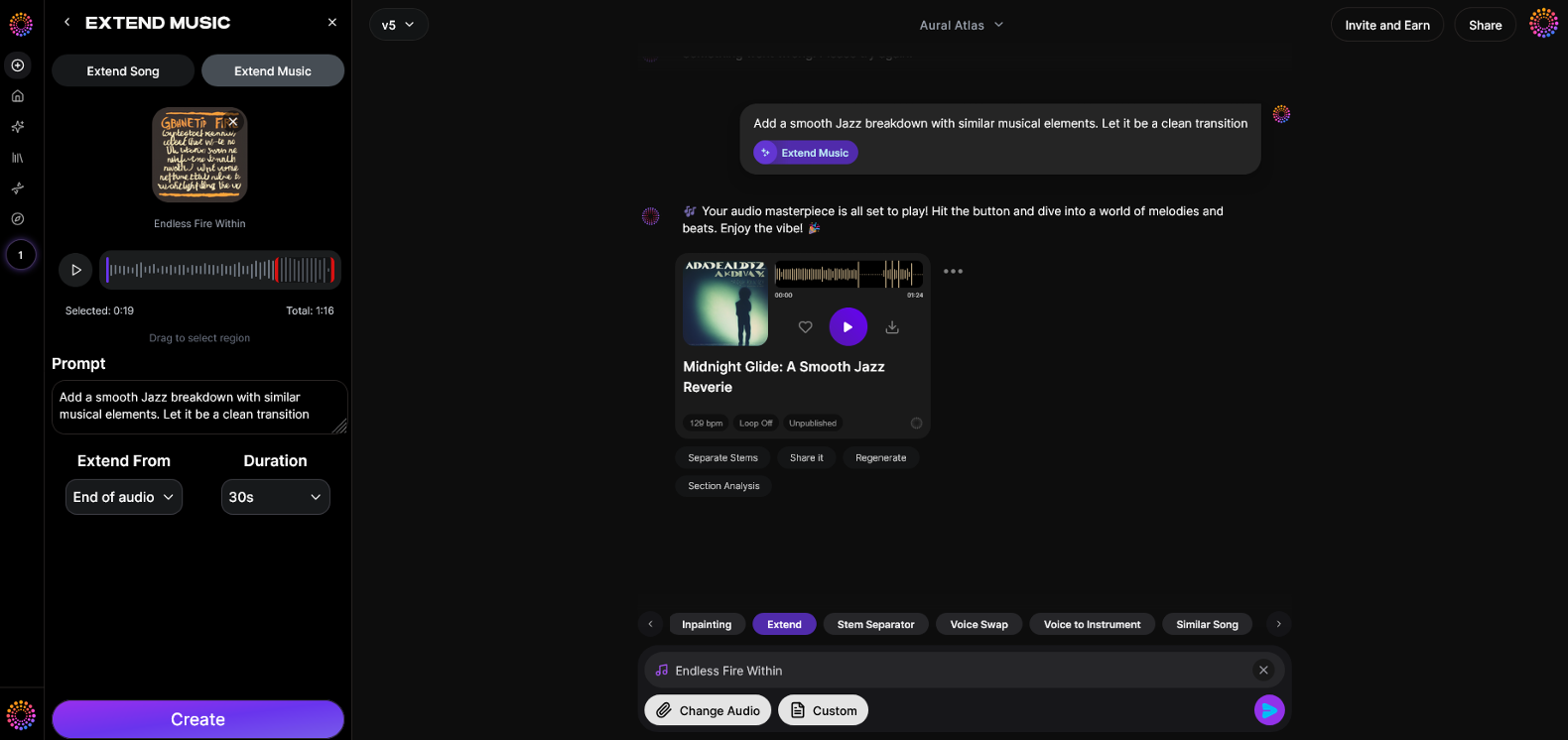
AI-powered platforms like Soundverse streamline the process dramatically. In the Step-by-Step Guide on How to Extend Songs Using AI Tools, you simply upload your track, choose the “Extend Music” option, and let AI analyze rhythm and transitions automatically. The system proposes where to loop sections, elongate fills, or fade out appropriately.

This process helps producers focus on creativity rather than manual editing. You can also check tutorials like How To Make Any Song Longer using Adobe Audition Remix for traditional workflow comparisons. If you’re working on rap instrumentals, the video guide How To Extend Rap Beats & Shorten Rap Beats for Recording illustrates practical balancing between vocal flow and extended drum spacing.
To get more inspiration, watch our Soundverse Tutorial Series - 10. Make Deep House Music, which covers how house producers use long beat structures to evolve energy on the dance floor over extended patterns.
Creative Techniques Beyond Repetition
While looping is the easiest way to elongate a section, creative use of transitions, filters, and fills adds professional flair. Modern tools in Soundverse Arrangement Studio help automate these variations naturally without compromising groove.
Layer higher energy percussion every eight bars, introduce subtle melodic elements with automation, or break down a section entirely before rebuilding it. These methods become even more fluid when enhanced by Soundverse’s Stem Separation Magic Tool, which allows isolating kicks, snares, or synth layers for clean manipulation.
If you’re building your first beat or remix, check the FL Studio Easy Beginner Tutorial and match that workflow with Soundverse AI tools. Combining manual and AI-assisted methods helps achieve long, engaging versions that feel polished.
For those exploring deeper multi-section arrangements, watch Soundverse Tutorial Series - 8. "Explore" Tab to discover how to use the “Explore” interface for generating diverse pattern extensions.
Practical Workflow Example
- Import your existing beat or stem into Soundverse.
- Open the AI Extend Music feature.
- Preview section recommendations—intro, verse, chorus, outro.
- Fine-tune time markers or transition points.
- Export the extended version directly or continue arranging manually.
This workflow drastically reduces the time it takes to build an extended mix while maintaining sound quality. With automation and smart looping suggestions, new producers can move quickly from rough loops to release-ready arrangements.
Start Extending Your Beats Instantly with Soundverse
Unlock the power of AI to refine, expand, and remix your music seamlessly. Soundverse lets you turn short loops into full tracks while preserving rhythm and vibe—perfect for producers and creators of all levels.
Related Articles
- Generate AI Music with Soundverse Text-to-Music — Discover how to craft complete music tracks using only text prompts and Soundverse’s intelligent AI generator.
- What is Soundverse Arrangement Studio and What Does It Do — Learn how Soundverse’s Arrangement Studio helps creators fine-tune structure and expand musical ideas without breaking creative flow.
- Soundverse Introduces Stem Separation AI Magic Tool — Explore how Soundverse’s Stem Separation tool lets you isolate and manipulate individual elements of any track with precision.
- The Benefits of Composing with AI Music Generator — Understand how AI-driven composition can enhance creativity and streamline your music production workflow.
Here's how to make AI Music with Soundverse
Video Guide

Here’s another long walkthrough of how to use Soundverse AI.
Text Guide
- To know more about AI Magic Tools, check here.
- To know more about Soundverse Assistant, check here.
- To know more about Arrangement Studio, check here.
Soundverse is an AI Assistant that allows content creators and music makers to create original content in a flash using Generative AI.
With the help of Soundverse Assistant and AI Magic Tools, our users get an unfair advantage over other creators to create audio and music content quickly, easily and cheaply.
Soundverse Assistant is your ultimate music companion. You simply speak to the assistant to get your stuff done. The more you speak to it, the more it starts understanding you and your goals.
AI Magic Tools help convert your creative dreams into tangible music and audio. Use AI Magic Tools such as text to music, stem separation, or lyrics generation to realise your content dreams faster.
Soundverse is here to take music production to the next level. We're not just a digital audio workstation (DAW) competing with Ableton or Logic, we're building a completely new paradigm of easy and conversational content creation.
TikTok: https://www.tiktok.com/@soundverse.ai
Twitter: https://twitter.com/soundverse_ai
Instagram: https://www.instagram.com/soundverse.ai
LinkedIn: https://www.linkedin.com/company/soundverseai
Youtube: https://www.youtube.com/@SoundverseAI
Facebook: https://www.facebook.com/profile.php?id=100095674445607
Join Soundverse for Free and make Viral AI Music

We are constantly building more product experiences. Keep checking our Blog to stay updated about them!