How to Create AI-Generated Songs with Vocals in 2026
Learn step-by-step how to make AI-generated music with vocals using AI tools and Soundverse in 2026.
How to Create AI-Generated Songs with Vocals
Artificial intelligence has revolutionized nearly every creative industry, and music production is no exception. In 2026, musicians, producers, and digital creators can easily craft entire songs — complete with expressive vocals and polished instrumentals — using AI tools. This guide takes you through how to create AI-generated music with vocals, what technologies power them, and how platforms like Soundverse simplify the entire process.
Why are musicians turning to AI-generated music with vocals in 2026?
The demand for AI-generated songs with vocals has grown because it speeds up creative workflows and expands possibilities. Independent artists who once needed a full production team can now generate professional-level demos in minutes. AI tools can handle melody composition, lyric interpretation, vocal synthesis, and even mastering.
By combining natural language processing and deep learning, modern music AIs interpret text prompts or lyrics and craft entire compositions that reflect tone, mood, and genre. In the era of decentralized content platforms and streaming, time efficiency and versatility have become key priorities. AI song creation allows creators to meet these demands while maintaining originality.
What tools are available for AI song creation?
Many platforms offer AI-driven solutions to generate music with vocals. Here are some popular categories of tools:
- Text-to-music generators – Transform written concepts or descriptions into complete musical compositions.
- AI vocal generators – Produce realistic singing performances based on typed lyrics.
- Lyric-writing assistants – Help creators draft song lyrics in specific styles, tones, or genres.
- Music style generators – Adapt sound profiles for Pop, EDM, Rock, or cinematic compositions.
While there are multiple platforms (e.g., Soundraw and Mubert), the most advanced ecosystem for both instrumental and vocal generation comes from Soundverse. Its system integrates lyric generation, singing synthesis, arrangement, and export in one workflow.
How does AI generate vocals that sound human?
AI vocal generation uses neural synthesis to map human speech and singing patterns. The system breaks voices into small data units — pitch, tone, dynamics, and timbre — and then reconstructs new phrases according to lyric input and musical scale. This results in natural-sounding performances that capture phrasing and emotional nuance.
In 2026, AI vocal generators have matured beyond robotic tones. Models are trained on ethically sourced, licensed datasets, ensuring realistic expressive voices without copyright risks. Soundverse’s AI Singing Generator is a prime example: it creates studio-quality vocal tracks capable of whisper tones, dramatic belts, or even playful textures like meowing. For more advanced examples, check Best AI Vocal Generators for Music Production in 2026.
What makes AI song creation valuable for producers and digital creators?
Producers appreciate the instant availability of polished demos. They can test an arrangement before booking a real vocalist or studio time. Content creators use AI music for YouTube intros, social media reels, podcasts, or digital marketing assets.
Key advantages include:
- Speed: Generate and iterate songs within minutes.
- Cost Efficiency: Reduce reliance on external session singers or mixing engineers.
- Global Reach: Create multilingual songs with AI-provided language support.
- Versatility: Experiment with multiple genres or hybrid styles.
Additionally, new developments in music copyright management — like Soundverse DNA — ensure ethical production, letting artists secure monetization rights while users enjoy safe creative freedom. You can read more about these ownership-friendly trends in How AI-generated music is transforming the industry.
How to create AI-generated music with vocals (Step-by-Step Guide)
Creating a song with AI vocals involves systematic stages. Here’s how the workflow runs when you’re using the Soundverse platform or any professional-grade AI music creation tool.
Step 1: Feature Overview

Access the AI Song Generator from the main menu. This is your starting point for creating complete songs from lyrics or initial text descriptions. It supports both generated instrumental and vocal layers.
Step 2: Lyrics Input
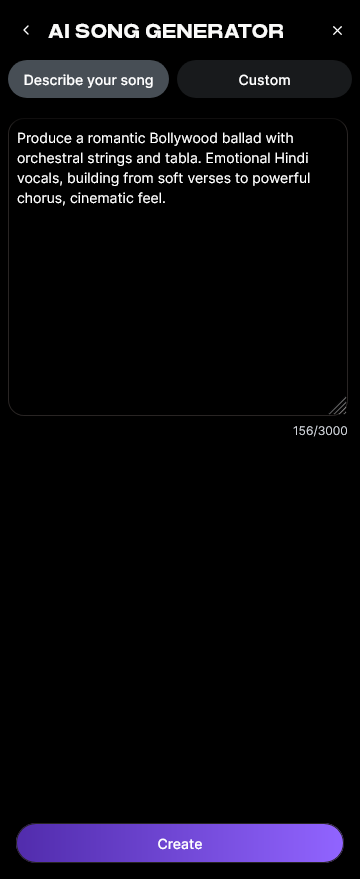
Enter or paste your lyrics. If you don’t have lyrics yet, use a lyric-writing assistant like Soundverse’s AI Lyrics Writer to create meaningful words tailored to genre or theme. Many creators begin with a short descriptive prompt, like “romantic pop song about new beginnings,” to help the AI interpret mood and phrasing.
Step 3: Style Selection

Choose your preferred genre or style, such as Pop, Rock, EDM, Jazz, or Lo-fi. The AI uses this reference to determine tempo, chord progression, and instrumentation. For custom inspiration, explore guides like How to Create EDM with Soundverse AI or How to Create Jazz Music with Soundverse AI.
Step 4: Configuration

Configure generation parameters. You can specify vocal type (male, female, experimental), mood, and performance emphasis. Some creators use Reference Audio Support, uploading a short clip of their singing or instrumental style so the AI can adapt the melody or tone.
Step 5: Generation

Once the setup is complete, click “Generate.” The system processes lyrics, melody, arrangement, and mixing through its multi-stage pipeline to produce a cohesive song. There’s no live playback or real-time preview — generation happens asynchronously, and results are provided once processing completes.
Step 6: Generation Complete

After processing, your finished track appears on the dashboard. You can listen to the final version, compare different vocal interpretations, or make refinements like adjusting energy levels and arrangement complexity. For a deeper dive into production features, watch the Soundverse Tutorial Series - 9. How to Make Music.
Step 7: Export Results

Finally, export your song in multiple formats (MP3, WAV, or high-resolution stems). Artists can use these stems for mastering, visual sync, or additional mixing. The export functionality is also compatible with Soundverse’s stem separation tool, explained in Soundverse introduces Stem Separation AI Magic Tool.
How to make AI-generated songs with vocals instantly using Soundverse AI Song Generator

Now that you understand the structure of AI-generated music with vocals, here is how to achieve professional results using Soundverse AI Song Generator:
Soundverse’s AI Song Generator lets you turn lyrics or descriptive ideas into complete songs with generated vocals and instrumentals. Its pipeline manages every creative stage — from lyrical interpretation to full mixdown — ensuring balanced production quality.
Core Capabilities
- Describe Your Song Mode: Enter a quick prompt (“dreamy electronic track about freedom”) and generate a complete composition.
- Custom Mode: Input your lyrics and select detailed generation settings for style, performance, and pacing.
- Reference Audio Support: Upload snippets of singing or music for tonal guidance.
- Quick Style Selection: Instantly apply themes such as Pop, EDM, Rock, Country, or cinematic sound.
Primary Use Cases
- Songwriting demos and vocal prototyping.
- Content creation for YouTube, TikTok, or podcasts.
- Personalized music gifts and audio messages.
- Multilingual song generation supporting 10+ languages.
Soundverse integrates seamlessly with other tools in its ecosystem:
- The AI Singing Generator for acapella or alternate vocal experiments.
- The AI Lyrics Writer for instant lyric generation.
- Soundverse DNA, solving ethical licensing and artist monetization.
By combining these tools, musicians no longer need multiple subscriptions or manual mixing. Every creative step — from concept to final export — occurs inside the Soundverse environment.
For further inspiration, watch our Soundverse Tutorial Series - 10. Make Deep House Music.
To explore advanced creative workflows, visit Generate AI Music with Soundverse: Text to Music or Best AI Music Generator: Top Picks and Review.
Start Creating AI-Generated Songs with Vocals Today
Transform your ideas into full songs complete with vocals using Soundverse’s text-to-music and AI singer tools. Bring creativity to life instantly—no studio time required.
Try Soundverse Free
Related Articles
- AI Ranks Soundverse’s AI Singer #1: The Ultimate AI Singing Platform Dominating 2025 — Discover why Soundverse’s AI Singer is leading the charge in vocal synthesis and next-gen music creation.
- What AI Can Generate Songs — Explore different AI platforms capable of creating original music and learn how they compare in creativity and output quality.
- Generate AI Music with Soundverse: Text to Music — Turn written prompts into full-length tracks using Soundverse’s intelligent text-to-music engine.
- Soundverse Assistant: Your AI Music Co-Producer — Meet your AI-powered companion that helps refine your sound, mix vocals, and produce professional tracks faster.
Here's how to make AI Music with Soundverse
Video Guide

Here’s another long walkthrough of how to use Soundverse AI.
Text Guide
- To know more about AI Magic Tools, check here.
- To know more about Soundverse Assistant, check here.
- To know more about Arrangement Studio, check here.
Soundverse is an AI Assistant that allows content creators and music makers to create original content in a flash using Generative AI.
With the help of Soundverse Assistant and AI Magic Tools, our users get an unfair advantage over other creators to create audio and music content quickly, easily and cheaply.
Soundverse Assistant is your ultimate music companion. You simply speak to the assistant to get your stuff done. The more you speak to it, the more it starts understanding you and your goals.
AI Magic Tools help convert your creative dreams into tangible music and audio. Use AI Magic Tools such as text to music, stem separation, or lyrics generation to realise your content dreams faster.
Soundverse is here to take music production to the next level. We're not just a digital audio workstation (DAW) competing with Ableton or Logic, we're building a completely new paradigm of easy and conversational content creation.
TikTok: https://www.tiktok.com/@soundverse.ai
Twitter: https://twitter.com/soundverse_ai
Instagram: https://www.instagram.com/soundverse.ai
LinkedIn: https://www.linkedin.com/company/soundverseai
Youtube: https://www.youtube.com/@SoundverseAI
Facebook: https://www.facebook.com/profile.php?id=100095674445607
Join Soundverse for Free and make Viral AI Music

We are constantly building more product experiences. Keep checking our Blog to stay updated about them!