How to Create AI-Generated Songs for OTT Platforms and Web Series in Any Language
Learn how to create AI-generated songs for OTT and web series using Soundverse AI Song Generator in any language.
How to Create AI-Generated Songs for OTT Platforms and Web Series in Any Language
In 2026, the world of entertainment is moving faster than ever before. With OTT platforms dominating global streaming and web series being a primary source of digital storytelling, music production has also evolved toward automation and intelligence. Traditional composition workflows are merging with next-gen AI music creation tools, enabling creators to generate multilingual, audience-specific songs in minutes instead of weeks.
From Netflix-style dramas to regional web content on platforms like Hotstar or VIU, the demand for adaptive background music and vocal tracks is increasing rapidly. Composers, sound designers, and post-production engineers now rely heavily on AI-assisted music models to deliver cinematic and immersive audio experiences. The trend aligns with reports detailed in How AI-Generated Music is Transforming the Music Industry, which predicts a surge in intelligent sound design across OTT ecosystems.
Why AI Music Creation Matters for OTT and Web Series Soundtracks
Music for OTT content isn’t just decoration—it carries emotional weight, defines character moods, and elevates scenes. However, the pace at which episodes release often leaves teams struggling to finalize the right sound. AI music creation simplifies this by turning text prompts or simple descriptions into full arrangements. Whether it’s melancholy piano for a slow drama or upbeat EDM for a chase scene, producers can generate accurate, scene-perfect compositions with minimal manual tweaking.
For creators working on multilingual web series in 2026, translation and localization are also major hurdles. AI music systems like Soundverse’s multilingual feature allow producers to create songs in 10+ languages seamlessly, offering vocal prototyping for both regional and international releases.
How to Make Multilingual AI-Generated Songs for Streaming Content with Soundverse

Soundverse’s AI Song Generator is specifically engineered for OTT and web series production. It operates through a structured multi-stage pipeline that handles lyrics, melody generation, arrangement, and mixing — producing a fully realized composition without human intervention beyond creative direction.
Feature Overview
Soundverse AI Song Generator offers two creative modes:
- Describe Your Song Mode: Type a prompt describing the mood, genre, or scenario (e.g., "a mysterious instrumental for a sci-fi web series intro") and get a complete song within minutes.
- Custom Mode: Use your own lyrics and modify generation parameters like instrumental style or tempo. Users can also upload reference audio—either a music file or a vocal track—to match pacing, emotion, or energy. Quick Style Selection lets you pick genres such as Pop, Rock, or EDM, facilitating precise OTT content sound design. It’s ideal for situations where you need music for background score, title sequences, or multilingual vocal inserts for region-specific edits of your web series.
How to Make Music for OTT Platforms Using Soundverse AI Song Generator
Follow this step-by-step guide to create AI-generated songs ready for streaming productions.
Step 1: Feature Overview

Access the AI Song Generator from the main menu on the Soundverse dashboard. This is the starting point for any AI music creation workflow related to web series or OTT production.
Step 2: Lyrics Input
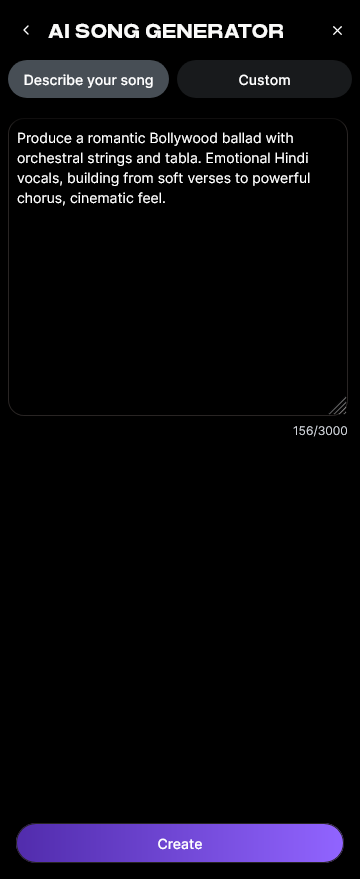
Enter or paste your lyrics. The generator allows text descriptions or full written lyrics in any supported language. This makes localization effortless for creators needing Hindi, Spanish, Japanese, or Arabic versions of songs.
Step 3: Style Selection

Choose from multiple styles that align with your scene’s vibe. Common OTT genres include cinematic orchestral, ambient, urban beats, and lofi patterns. The Quick Style Selection option ensures the result fits well with your show’s theme.
Step 4: Configuration

Adjust generation parameters. Here you set tempo, energy levels, and instrumental presence to fine-tune the sound character. You can also toggle between instrumental-only or songs with AI-generated vocals, depending on placement (opening theme or background track).
Step 5: Generation

Once configurations are set, click "Generate." The system processes your inputs asynchronously—analyzing lyrics, constructing melodies, arranging instruments, and mixing vocal layers.
Step 6: Generation Complete

The completed track appears in your workspace. You can preview the AI-generated output and assess suitability for your sequence or dialogue segment. The track’s metadata and musical structure are optimized for broadcast-ready production.
Step 7: Export Results

Export the final AI-generated song into multiple formats, ideal for OTT post-production pipelines such as MP3, WAV, or stem-separated versions. For advanced soundtrack customization, Soundverse integrates Soundverse Trace, a rights protection and attribution layer ensuring safe content licensing. For a deeper dive, watch our guide on creating Deep House music and how to make music using the Explore tab.
Pro Tips for Web Series Audio Production in 2026
- Plan Music Early: Start your OTT content sound design during scriptwriting to ensure accurate tone mapping for each episode.
- Use Reference Tracks: Upload samples of similar music using the Similar Song Generator, available directly in Soundverse, to avoid copyright issues while maintaining thematic consistency.
- Cross-language Testing: With multilingual AI songs, always verify pronunciation using the AI Singing Generator for clear articulation across language versions.
- Combine Tools for Depth: Pair Soundverse with the Arrangement Studio (covered in What is Soundverse Arrangement Studio and What Does It Do) to refine stems or mix layers.
- Secure Attribution: Employ Soundverse Trace when submitting tracks to OTT networks—it embeds detailed AI creation data for seamless rights protection. For a deeper understanding of genre adaptation and prompt design, creators can explore tutorials like Generate AI Music with Soundverse Text-to-Music or Join the Soundverse Affiliate Program.
How to Integrate AI-Generated Songs into OTT Post-Production
The integration stage focuses on syncing songs with video timelines. Exported songs can be edited within your main digital audio workstation (DAW). Many post-production teams pair Soundverse outputs with dialogue and ambient sound effects in apps such as Adobe Audition or Pro Tools. Multilingual versions of theme songs can be swapped per regional release, giving OTT platforms dynamic cultural reach. This strategy became common by late 2025 and is now a standard in 2026 global streaming workflows.
How AI Composer Tools Enable Cost-Effective Production
Traditional composer hiring for multiple languages becomes expensive. AI composer tools reduce turnaround time and cost by automating melody generation and providing stylistic flexibility. Combined with seed prompts or lyrical inputs, they are revolutionizing audio pipelines from advertisement jingles to 10-episode drama soundtracks. Creators using Soundverse Assistant can automatically select the right AI magic tool, making the co-production process highly efficient.
Start Creating AI-Generated Music Today!
Unlock the power of AI music creation with Soundverse. Generate custom tracks for your OTT shows, films, or web series in any language—without any composer or complex tools.
Related Articles
- The Role of AI Music in Film and Television — Discover how AI-generated music is transforming soundtracks and production workflows in modern visual entertainment.
- How AI-Generated Music is Transforming the Music Industry — Explore how artificial intelligence is changing composition, licensing, and creation for musicians and media producers.
- Generate AI Music with Soundverse Text-to-Music — Learn how to turn text prompts into unique songs instantly using Soundverse’s text-to-music generator.
- Soundverse Assistant: Your AI Music Co-Producer — Meet your new creative partner—Soundverse Assistant—helping producers craft the perfect tracks effortlessly.
Here's how to make AI Music with Soundverse
Video Guide

Here’s another long walkthrough of how to use Soundverse AI.
Text Guide
- To know more about AI Magic Tools, check here.
- To know more about Soundverse Assistant, check here.
- To know more about Arrangement Studio, check here.
Soundverse is an AI Assistant that allows content creators and music makers to create original content in a flash using Generative AI. With the help of Soundverse Assistant and AI Magic Tools, our users get an unfair advantage over other creators to create audio and music content quickly, easily and cheaply. Soundverse Assistant is your ultimate music companion. You simply speak to the assistant to get your stuff done. The more you speak to it, the more it starts understanding you and your goals. AI Magic Tools help convert your creative dreams into tangible music and audio. Use AI Magic Tools such as text to music, stem separation, or lyrics generation to realise your content dreams faster. Soundverse is here to take music production to the next level. We're not just a digital audio workstation (DAW) competing with Ableton or Logic, we're building a completely new paradigm of easy and conversational content creation.
TikTok: https://www.tiktok.com/@soundverse.ai
Twitter: https://twitter.com/soundverse_ai
Instagram: https://www.instagram.com/soundverse.ai
LinkedIn: https://www.linkedin.com/company/soundverseai
Youtube: https://www.youtube.com/@SoundverseAI
Facebook: https://www.facebook.com/profile.php?id=100095674445607
Join Soundverse for Free and make Viral AI Music

We are constantly building more product experiences. Keep checking our Blog to stay updated about them!