How to Arrange Music for a Band: A Complete Guide for 2026
Learn arranging music for band with expert techniques and tools. Use Soundverse Arrangement Studio to create professional band arrangements in 2026.
How to Arrange Music for a Band
Arranging music for a band in 2026 requires a creative blend of theory, technology, and collaboration. With evolving musical landscapes and advanced digital tools, musicians and arrangers can now craft full-band scores or modern ensemble tracks faster and more precisely than ever before. Whether you are composing for a rock, jazz, pop, or hybrid band setup, understanding the musical arrangement process helps transform simple melodies into rich, dynamic performances.
Why is arranging music for band so important in 2026?
In today's music ecosystem, arrangements define identity. A band's unique sound often comes from how parts are distributed across instruments—how the guitar interacts with the bass line, how horns accentuate rhythmic hits, or how vocals blend with backing harmonies. By mastering band arrangement techniques, composers ensure every performer contributes meaningfully. As AI-assisted songwriting becomes mainstream (as discussed in how AI-generated music is transforming the music industry), the human touch in orchestrating for band remains irreplaceable.
Arranging isn’t merely assigning notes to players; it’s balancing texture, tension, and dynamics. Great arrangers consider the sonic spectrum—low-end richness from bass and kick drum, midrange clarity from guitars and keys, and top-end sparkle from vocals or brass.

How to make band arrangements with Soundverse Arrangement Studio
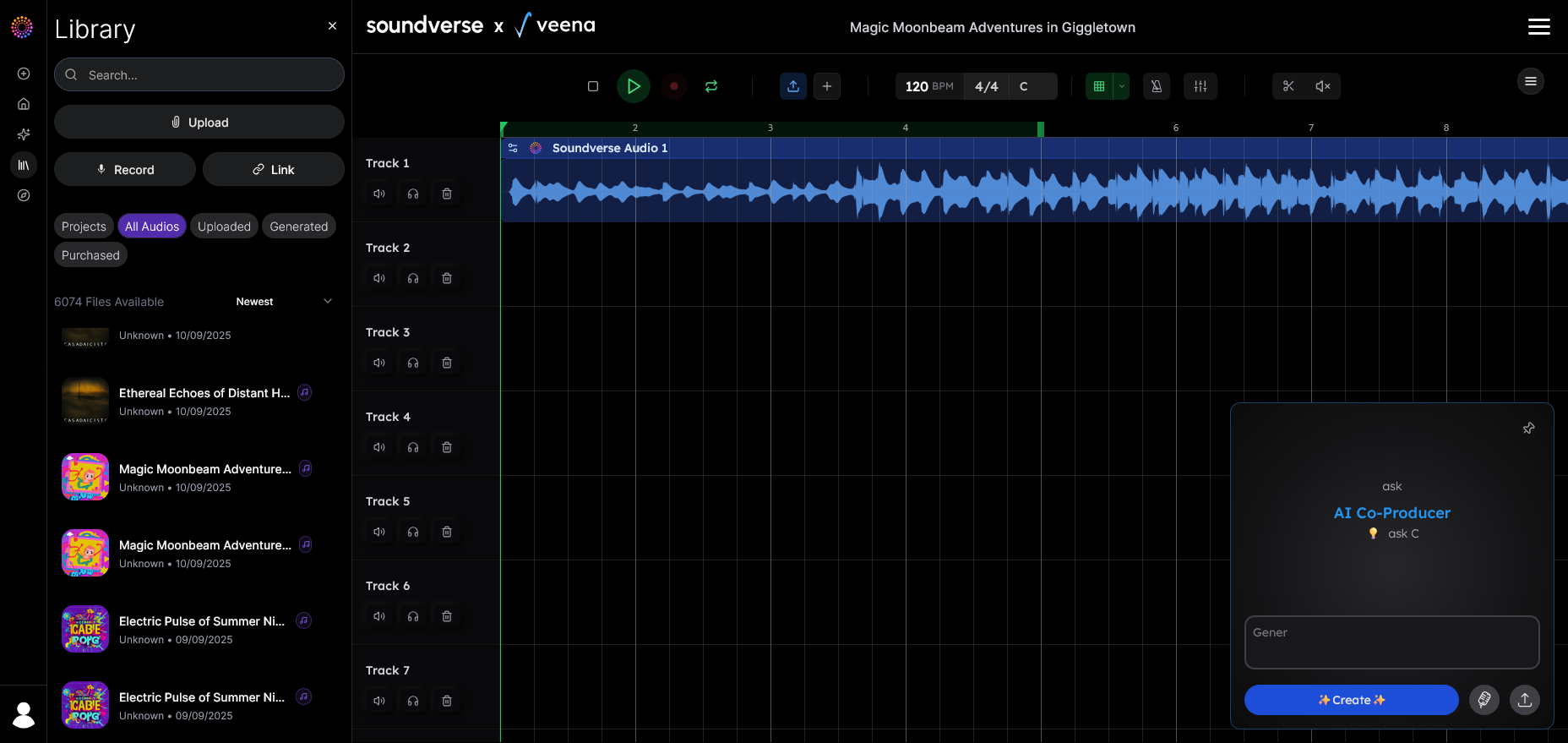
Soundverse offers a modern way to refine and orchestrate band music. Arrangement Studio is a collaborative environment where creators open generated tracks for detailed editing, section rearrangement, and compositional refinement. It integrates with Soundverse DNA and other generation tools, allowing music creators to expand a single idea into a fully orchestrated band piece.
Core Capabilities include:
- Multitrack Editing: Users can access and manipulate multiple tracks at once—perfect for writing band parts and adjusting instrument sections.
- Integration with Generation Tools: Combine multiple stems or AI-generated song ideas seamlessly.
- Refining DNA-Generated Tracks: Start from an AI base and evolve it through human creativity for authentic band feel.
Primary Use Cases:
- Reimagine rock, jazz, and orchestral band setups.
- Merge several musical stems (e.g., drums, bass, guitar) with unique arrangement ideas.
- Streamline collaboration between songwriters and instrumentalists.
Additional Soundverse tools like Section Analysis, which labels song sections automatically (Intro, Verse, Chorus, Bridge, etc.), and Stem Separator, which isolates elements such as guitar, drums, or vocals, make the editing workflow efficient. Using these tools together shortens the musical arrangement process from hours to minutes.
For a deeper dive, watch our guide on how to make music.
Step 1: Define your band’s instrumentation
Before any notes appear on the score, define your band’s lineup. Common setups in 2026 include:
- Pop/Rock Band: Vocals, guitar, bass, drums, keyboard.
- Jazz Ensemble: Saxophone, trumpet, trombone, rhythm section.
- Fusion/Experimental Band: Electronic elements mixed with acoustic instruments.
Decide how each member contributes. For instance, guitarists might handle harmonic fills, keyboardists add texture, and horn players reinforce melodic lines. A clear instrumentation map avoids frequency clashes and helps with clean mixing later.
Step 2: Analyze your source material
Using Soundverse’s Section Analysis, identify structural components of your song—Intro, Verse, Chorus, Bridge, and Outro. Understanding section flow prevents over-arranging and ensures consistency. A tight structure helps musicians rehearse efficiently and maintains listener engagement throughout.
For AI-generated or demo tracks, run your audio through Stem Separator to extract raw material like bass lines or drum grooves. These isolated stems form the backbone of your band arrangement.
Step 3: Write band parts strategically
Now begins the true craft of arranging music for band. Focus on voicing, dynamics, and spacing.
- Voicing: Decide how chords distribute. Spread harmonies across different instruments – horns, guitars, keyboards – ensuring clarity and balance.
- Rhythmic Interaction: Avoid crowding. Let one section lead rhythmically while others support.
- Countermelodies: Include subtle responses between sections—for example, a guitar riff answering a vocal phrase.
- Dynamic Design: Build crescendos between sections. Band arrangements thrive on contrast—soft intros, explosive choruses, nuanced bridges.
An effective arranging workflow blends creativity with organization. Professionals frequently rely on Soundverse Assistant for overall creative management and arrangement alignment.
Step 4: Combine and refine stems in Soundverse Arrangement Studio
Upload your stems or compositions to Arrangement Studio. The tool allows you to combine multiple recorded or generated stems, organizing them into sections. You can adjust lengths, swap instruments, or layer harmonies. Because the workflow is asynchronous, you upload, process, and then receive editable results – ideal for collaborators working across locations.
With integrated editing, arrangers can:
- Adjust drum groove intensity or bass phrasing.
- Add harmonic layers using AI-generated tracks refined through human oversight.
- Rearrange sections to test emotional pacing.
Once satisfied, export mixed stems for recording or live rehearsal. Learn more about this workflow at What is Soundverse Arrangement Studio and what does it do.
Step 5: Incorporate rehearsal feedback
An arrangement’s success depends on how it translates in performance. After rehearsals, revisit your stems in Arrangement Studio. Modify densities or simplify technical parts based on musician feedback. For educational ensembles, include cue lines or simplified notation for balance.
As seen across bands adapting digital tools in 2026, integrating human revisions post-AI generation ensures genuine feel and interpretative depth. You can see these collaborative results in practice by watching Soundverse Tutorial Series - Explore Tab.
Step 6: Finalize your arrangement and export
Evaluate balance one final time:
- Is every section audible?
- Are transitions smooth?
- Do instrumental colors support the song’s message?
Finish your project in Arrangement Studio by combining all refined elements and exporting the master stems or notation cues. This step formalizes your musical arrangement process—from concept to complete band-ready project.
Pro Tips for Advanced Band Arrangement
- Use harmonic layering: Blend piano and guitar textures for richer harmonies.
- Emphasize “roles,” not instruments: Think of sonic texture—lead, support, rhythm, ambiance—rather than fixed instrument identity.
- Leverage repetition: Subtle recurring motifs build familiarity.
- Experiment with genre crossover: Modern hybrid bands incorporate EDM-inspired rhythm design; see examples at Now Generate Music with Filters.
- Explore AI generation for inspiration: Use Generate AI Music with Soundverse to develop melodic or rhythmic foundations before arranging manually.
Start Arranging Music Smarter with Soundverse AI
Transform your raw ideas into professional band arrangements using AI-powered precision. Simplify your workflow and let creativity lead the process.
Related Articles
- What Is Soundverse Arrangement Studio and What Does It Do — Discover how the Soundverse Arrangement Studio helps musicians organize and arrange complex compositions effortlessly using AI.
- How to Create Jazz Music with Soundverse AI — Learn the techniques to build smooth, dynamic jazz arrangements powered by Soundverse AI tools.
- How to Create Country Music with Soundverse AI — Get a step-by-step guide to creating authentic country songs and arrangements with AI-based music composition.
- How an AI Music Generator Inspires Creative Fusion — Explore how AI tools spark collaboration and innovation across genres and band arrangements.
Here's how to make AI Music with Soundverse
Video Guide

Here’s another long walkthrough of how to use Soundverse AI.
Text Guide
- To know more about AI Magic Tools, check here.
- To know more about Soundverse Assistant, check here.
- To know more about Arrangement Studio, check here.
Soundverse is an AI Assistant that allows content creators and music makers to create original content in a flash using Generative AI.
With the help of Soundverse Assistant and AI Magic Tools, our users get an unfair advantage over other creators to create audio and music content quickly, easily and cheaply.
Soundverse Assistant is your ultimate music companion. You simply speak to the assistant to get your stuff done. The more you speak to it, the more it starts understanding you and your goals.
AI Magic Tools help convert your creative dreams into tangible music and audio. Use AI Magic Tools such as text to music, stem separation, or lyrics generation to realise your content dreams faster.
Soundverse is here to take music production to the next level. We're not just a digital audio workstation (DAW) competing with Ableton or Logic, we're building a completely new paradigm of easy and conversational content creation.
TikTok: https://www.tiktok.com/@soundverse.ai
Twitter: https://twitter.com/soundverse_ai
Instagram: https://www.instagram.com/soundverse.ai
LinkedIn: https://www.linkedin.com/company/soundverseai
Youtube: https://www.youtube.com/@SoundverseAI
Facebook: https://www.facebook.com/profile.php?id=100095674445607
Join Soundverse for Free and make Viral AI Music

We are constantly building more product experiences. Keep checking our Blog to stay updated about them!
Image Steps: []