How to Add Music to Lyrics Using AI (2026 Guide for Musicians and Creators)
Discover how to add music to lyrics using AI tools like Soundverse in 2026.
How to Add Music to Lyrics Using AI
Artificial intelligence has completely changed the way songs are composed, produced, and released. By 2026, musicians, songwriters, and creators can seamlessly add music to lyrics using AI, transforming plain words into fully arranged songs with realistic vocals and instrumental layers. This process no longer requires deep technical expertise or an expensive studio setup. Instead, modern platforms enable creators to input lyrics and have their song produced instantly.
What does it mean to add music to lyrics using AI?
Adding music to lyrics using AI means feeding written song lyrics into an artificial intelligence system that analyzes text sentiment, rhythm, and structure, then composes music, melody, and instrument arrangements to match. These advanced models can interpret emotion, tempo hints, and genre cues embedded in your words. In 2026, this technology uses neural networks capable of generating personalized music compositions almost indistinguishable from human-made works.

The core function is simple: you input your lyrics, choose a genre, and let the AI handle the rest. The output is a complete composition with vocals, instrumentation, and mixing, ready for export or sharing.
Why use AI to create songs from lyrics?
- Speed – AI greatly shortens the traditional songwriting process. Instead of coordinating multiple collaborators, creators get a finished demo in minutes.
- Accessibility – Musicians without production knowledge can still produce professional-quality music.
- Creative diversity – Modern AI songwriting tools allow experimenting across genres from pop to jazz, EDM, rock, and cinematic music.
- Cost efficiency – No need for full studio sessions for testing early song drafts.
- Cross-language creativity – AI can compose melodies around lyrics written in multiple languages, expanding global reach.

What are the 2026 trends in AI music generation?
The AI music scene has evolved fast between 2024 and 2026. By 2026, trends include multi-modal composition automation, human-AI collaboration workflows, and emotionally aware music generation.
- Emotion modeling: AI now interprets lyrical mood to align chord progressions naturally.
- Music composition automation: Entire arrangements are created automatically without manual input.
- Voice customization: AI singers can adapt timbre and vocal style based on genre.
- Adaptive genre blending: Systems can merge rock, pop, and EDM structures inside one song.
If you want more insight into current industry trajectories, explore music industry trends for 2026.
How do AI songwriting tools work?
Most AI songwriting tools combine natural language processing and audio generation. The workflow includes:
- Text analysis for rhythm and rhyme.
- Melody generation using neural synthesis.
- Arrangement creation tied to style presets.
- Mixing and mastering via automated systems.
These engines balance creativity with user control. Some tools, like Soundraw and Mubert, allow prompt-based production, but platforms specialized for lyric-to-song transformation offer deeper processing pipelines.
For examples, AI Music & Song Generator, LyricLab, and MelodyCraft explore similar lyric-to-music workflows that let creators turn words into full musical pieces.
How to add music to lyrics using AI – Step-by-Step Guide
Now, let’s break down the process to help creators understand exactly how to transform words into songs using modern AI.
Step 1: Feature Overview

Access a songwriting platform or an AI Song Generator from its main menu interface. Ensure you select a service designed for lyrical inputs rather than melody conversion tools.
Step 2: Lyrics Input
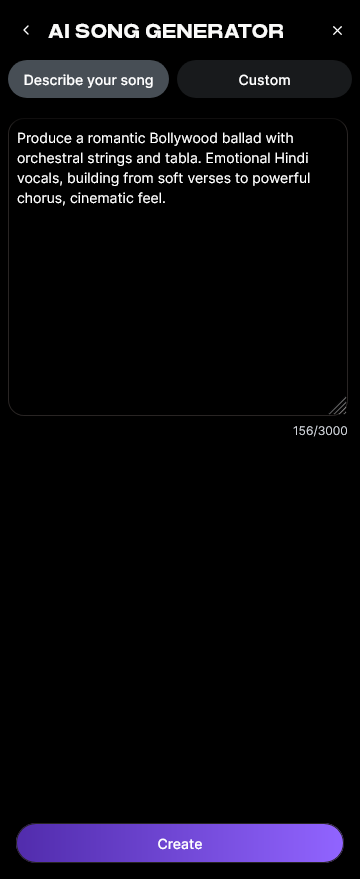
Paste or write your lyrics into the text input box. Many modern systems analyze rhymes, punctuations, and structure to estimate timing and phrase divisions. You can insert verses, chorus sections, or bridge parts individually.
Step 3: Style Selection

Pick a style preset or choose among genres such as pop, EDM, hip-hop, rock, or lo-fi. This decision influences tempo, rhythm, and instrumentation. Some tools even allow hybrid genre settings.
Step 4: Configuration

Define parameters like vocal style, instrumentation layers, and mixing intensity. Configuration can include options for how the vocal emotion aligns with lyrical meaning.
Step 5: Generation

Click “Generate” and let the engine process your lyrics. The AI then composes melody lines, harmonies, and full instrumental backings. It combines machine-learning models that replicate professional songwriting structures.
Step 6: Generation Complete

After processing, you’ll see the result displayed — a complete song containing vocals and melodies connected to your lyrics. Depending on system design, the output includes metadata like BPM and genre tags.
Step 7: Export Results

Download the generated song in available formats such as MP3 or WAV. This file can then be used for sharing, uploading to YouTube, or including in your creative projects.
If you’re interested in advanced customization methods like genre filters and instrument selectors, explore multi-tool workflows for cross-style production.
For a deeper dive, watch our Soundverse Tutorial Series - How to Make Music to see real examples of AI-powered composition.
How to make music from lyrics with Soundverse AI Song Generator

Now that you understand the general process, here’s how you can create a full song instantly using Soundverse.
Soundverse’s AI Song Generator is designed specifically to turn lyrics or text descriptions into complete songs. It operates through a multi-stage pipeline — handling lyrics, melody, arrangement, and mixing. Users can work in two modes:
- Describe Your Song mode (Prompt-based): Type descriptive prompts like “an emotional pop ballad about hope,” and Soundverse creates the entire piece.
- Custom mode (Lyrics & settings): Paste your lyrics and customize genre, style, and vocal type.
Soundverse also supports reference audio uploads, enabling you to provide an existing melody or singing guide that influences how the AI interprets your song. Quick Style Selection allows instant genre picking like Pop, EDM, Rock, Jazz, and more.
Once generated, creators can export songs in multiple formats for demos, social content, and multilingual projects across more than ten languages. This flexibility appeals to global musicians looking to expand audiences without hiring studios.
Soundverse’s integrated ecosystem also includes:
- AI Singing Generator: Produce professional acapella vocals or experimental textures.
- Melody to Song Generator: Transform hums or melody recordings into complete arrangements.
- AI Lyrics Writer: Generate structured lyrics based on theme and tone.
These connect seamlessly within one platform, acting as your AI co-producer. Explore complementary guides like generate AI music with Soundverse text-to-music or Soundverse Assistant helps automate workflow to build advanced creative pipelines.
For creators interested in blending genres, check Soundverse tutorials like Make Deep House Music and Explore Tab Overview on our YouTube channel.
Practical tips for musicians using AI songwriting tools
- Add emotional context – Before generation, add cues like “upbeat celebration” or “melancholic jazz.” AI interprets these context signals accurately.
- Experiment with languages – Multilingual lyrics can help reach wider audiences.
- Iterate and refine – Generate multiple versions and select the best result.
- Combine human edits – Adjust lyrics or melodies slightly to personalize output.
- Review copyright usage – Check royalty-free aspects using guides like navigating the world of royalty-free and copyright-free music.
The Impact of AI on modern songwriting
By 2026, AI has democratized songwriting. Whether a hobbyist or a professional, the tools bridge technical gaps and allow expression without instrument skills. Systems such as Soundverse build on the idea of creative empowerment, letting everyone transform imagination into music effortlessly.
For songwriters who used to spend weeks arranging melodies around lyrics, AI composition automation has become a game-changing collaboration process — not replacing creativity but amplifying it.
Create Music from Your Lyrics Instantly with Soundverse AI
Transform written lyrics into fully produced tracks using Soundverse’s intelligent text-to-music technology. Empower your creativity and generate studio-quality compositions in minutes.
Related Articles
- Generate AI Music with Soundverse Text-to-Music — Discover how Soundverse turns words into music with advanced AI text-to-music generation.
- Soundverse Assistant: Your AI Music Co-Producer — Learn how Soundverse Assistant collaborates with you throughout the music creation process to refine lyrics and sound.
- The Benefits of Composing with AI Music Generator — Explore how AI music generators enhance creativity and streamline composition for artists globally.
- How to Create Rap Music with AI — Step-by-step guide to generate rap tracks using AI tools and transform your lyrics into rhythmic masterpieces.
Here's how to make AI Music with Soundverse
Video Guide

Here’s another long walkthrough of how to use Soundverse AI.
Text Guide
- To know more about AI Magic Tools, check here.
- To know more about Soundverse Assistant, check here.
- To know more about Arrangement Studio, check here.
Soundverse is an AI Assistant that allows content creators and music makers to create original content in a flash using Generative AI.
With the help of Soundverse Assistant and AI Magic Tools, our users get an unfair advantage over other creators to create audio and music content quickly, easily and cheaply.
Soundverse Assistant is your ultimate music companion. You simply speak to the assistant to get your stuff done. The more you speak to it, the more it starts understanding you and your goals.
AI Magic Tools help convert your creative dreams into tangible music and audio. Use AI Magic Tools such as text to music, stem separation, or lyrics generation to realise your content dreams faster.
Soundverse is here to take music production to the next level. We're not just a digital audio workstation (DAW) competing with Ableton or Logic, we're building a completely new paradigm of easy and conversational content creation. TikTok: https://www.tiktok.com/@soundverse.ai Twitter: https://twitter.com/soundverse_ai Instagram: https://www.instagram.com/soundverse.ai LinkedIn: https://www.linkedin.com/company/soundverseai Youtube: https://www.youtube.com/@SoundverseAI Facebook: https://www.facebook.com/profile.php?id=100095674445607
Join Soundverse for Free and make Viral AI Music

We are constantly building more product experiences. Keep checking our Blog to stay updated about them!