How Does Suno Work? A Complete 2026 Overview of AI Song Creation
Discover how Suno works, explore AI music creation in 2026, and learn how to use Soundverse’s AI Song Generator.
How Does Suno Work?
Understanding How Suno Works in 2026
Artificial intelligence has steadily transformed creative industries—from image generation to automated sound design. By 2026, one of the most fascinating evolutions has been in AI-driven music generation. Creators worldwide are exploring platforms that can transform text prompts, lyrics, and even emotions into fully composed songs. Among the names making waves in this space, Suno stands out for its specialized AI song creation pipeline.
This article focuses on how does Suno work, what makes its system effective for AI-based song generation, and how artists and creators can replicate its workflow using tools like the Soundverse AI Song Generator.

What Is Suno and What Does It Do?
Suno is an AI song creation platform that allows users to generate full musical compositions from text. It can accept descriptive prompts, lyrical input, or even ideas for tone and mood to produce songs complete with AI vocals and instrumental backing. Essentially, Suno brings together multiple AI models that understand language, composition, and production to automate songwriting.
Suno AI music generator operates on a pipeline similar to a digital musician’s creative process: it begins with words (lyrics or thematic text), determines melody and structure, arranges rhythm and instrumentation, and finally mixes and outputs a polished song. It appeals to digital creators, musicians, and enthusiasts who want to experiment without needing advanced studio skills.

How Does Suno Work Step by Step?
At its core, Suno uses a multi-stage AI process to move from a simple prompt to a finished piece of music. Here’s what typically happens:
- Text Interpretation: When you input lyrics or a descriptive phrase, Suno’s AI analyzes semantics and sentiment to determine the tone. For example, “a dreamy sunset love song” would influence tempo, chord progression, and vocal timbre.
- Melody Generation: Using deep learning models trained on musical datasets, the system creates melodies that align with the sentiment detected. It maps syllables to notes and builds harmonic progression.
- Arrangement and Instrumentation: Once a melodic framework is established, Suno adds multi-instrument layers. Different modules design drums, bass, guitar, synths, or orchestral sounds depending on the style.
- AI Vocals Creation: The system generates realistic human-like singing voices using advanced voice synthesis models. These vocals are placed according to the rhythmic structure and harmony.
- Final Mixing and Mastering: The AI automatically mixes levels—balancing vocals, instruments, and effects—and applies mastering techniques to provide professional quality output.
The entire process is automated and asynchronous, meaning it doesn’t generate music live in real time; it processes input and provides results after computation.
What Can You Create With Suno?
Suno’s design encourages open creativity. Typical use cases include:
- Songwriting Demos: Artists without full production studios can demo ideas quickly.
- Content Creation for Social Media: Creators can make unique background songs for posts or videos.
- Custom Greetings or Gifts: Personalized songs can be created for birthdays, anniversaries, or holidays.
- Multilingual Projects: Suno supports songs in several languages, expanding reach globally.
These use cases overlap with the broader AI music evolution discussed in articles like How AI-Generated Music Is Transforming the Music Industry and AI Music Generator and Human Composers: A Future Together. For a deeper dive, watch our guide on creating Deep House music or how to make music with Soundverse.
What Are Suno App Features?
In 2026, the Suno app features revolve around simplicity and creative accessibility:
- Prompt-Based Creation: Users describe a song idea in natural language and let the AI compose accordingly.
- Genre Style Selection: Choose from pop, EDM, rock, ambient, and more.
- Reference Support: Import short samples or vocal references to guide the tone.
- Lyric Input: Paste written lyrics to anchor composition around specific lines.
- Export Options: Save outputs in different formats for editing or sharing.
Suno Tutorial Overview — How to Use Suno for AI Music Creation
For musicians new to text-to-song technology, understanding the Suno workflow is essential:
- Prepare Your Idea: Write a sentence or paragraph describing your desired sound, emotion, and tempo.
- Provide Lyrics or Prompts: Input these directly into the Suno interface.
- Select Your Style: Define genre or instrument feel. Options like Pop, Rock, or EDM are common.
- Let AI Generate Music: Click generate and wait for processing.
- Review and Export: Listen to the completed composition and download if satisfied.
These steps mirror modern AI songwriting approaches found across several platforms, from Mubert alternatives to Soundraw alternative tools.
How Accurate and Creative Is Suno in 2026?
By 2026, AI-generated music has advanced significantly. Suno’s system reflects broader improvements in model training, diversity of musical genres, and integration of emotion in generated soundscapes. While mechanical patterns once dominated early 2024 AI music, now creativity feels more authentic—melodies flow naturally, harmonies adapt dynamically, and mixing levels mimic studio-grade refinement.
However, the results still depend heavily on your input prompts. Specificity in text descriptions or lyrical phrasing leads to stronger compositions. Many professionals now treat AI platforms like co-writers rather than mere engines, refining results through iteration.
How to Make AI Songs Like Suno Using Soundverse

Now that you understand how does Suno work, let’s explore how you can generate similar or even more flexible compositions with the Soundverse AI Song Generator.
Step 1: Feature Overview

Access the AI Song Generator tool from Soundverse’s main interface. This feature is purpose-built to turn lyrics or text descriptions into complete songs with AI-generated vocals and instrumentals.
Step 2: Lyrics Input
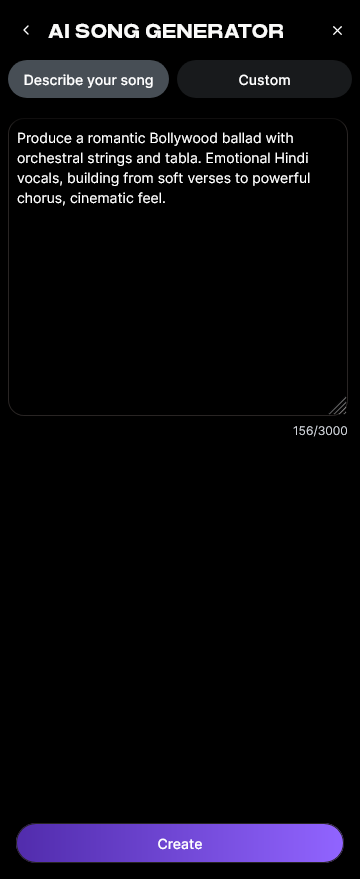
Paste your lyrics or type them into the editor. You can use Soundverse’s integrated AI Lyrics Writer if you need help crafting verses and choruses.
Step 3: Style Selection

Select your desired genre — Pop, EDM, Rock, or any available category. You can also use Quick Style Selection to instantly match your theme.
Step 4: Configuration

Adjust generation parameters such as vocal tone, tempo, and language. The system also supports Reference Audio for users who want to mimic certain melodies or singing styles.
Step 5: Generation

Click “Generate.” The AI processes multiple layers including lyrics, melody, arrangement, and mixing. It operates asynchronously: the system analyzes, composes, and then provides the full rendered piece.
Step 6: Generation Complete

Once complete, the generated results appear in your project dashboard. You can preview and refine as needed.
Step 7: Export Results

Download your track in multiple file formats for sharing or editing.
This process enables fast creation for demos, social content, or even multilingual projects. It’s ideal for those integrating music into digital campaigns or exploring themes like royalty-free AI sound creation.
For further tutorials, check the Soundverse “Explore” tab guide.
Why Choose Soundverse Over Suno?
While Suno focuses on automated song synthesis, Soundverse offers a suite of complementary tools:
- AI Music Generator: For purely instrumental compositions.
- AI Singing Generator: For generating high-quality acapella vocals or creative vocal textures.
- AI Lyrics Writer: For structured, genre-specific lyric generation.
Together, these create a complete ecosystem for end-to-end AI music production. You can explore Soundverse’s advancements further in Soundverse AI Revolutionizing Music Creation for New Age Content Creators and How to Create EDM with Soundverse AI.
Final Thoughts
In 2026, platforms like Suno have made AI music generation accessible to anyone with a creative spark. Understanding how Suno works helps creators appreciate the technology behind modern text-to-music generation. With Soundverse’s AI Song Generator, those same principles can be applied instantly—with more control, flexibility, and integration into a larger creative workflow.
Whether you want to compose full songs, create background tracks, or prototype vocal ideas, the blend of automation and artistry is within reach. AI isn’t replacing musicians—it’s augmenting their ability to express sound in new, exciting ways.
Start Creating Music Smarter with Soundverse
Experience AI-powered composition that turns ideas into songs instantly. Make studio-quality tracks, remix effortlessly, and take your creativity to the next level with the Soundverse platform.
- Best Suno Alternative: Soundverse AI Free Sign-Up — Discover why Soundverse stands out as one of the best free alternatives to Suno for AI-generated music.
- Generate AI Music with Soundverse Text-to-Music — Learn how Soundverse’s text-to-music tool lets you create full tracks from simple prompts instantly.
- Soundverse Assistant: Your AI Music Co-Producer — Explore how Soundverse Assistant helps streamline the creative process, acting as your intelligent music co-producer.
- AI Music Generator and Human Composers: A Future Together — Understand how AI tools like Soundverse complement human creativity to shape the future of music composition.
Here's how to make AI Music with Soundverse
Video Guide

Here’s another long walkthrough of how to use Soundverse AI.
Text Guide
- To know more about AI Magic Tools, check here.
- To know more about Soundverse Assistant, check here.
- To know more about Arrangement Studio, check here.
Soundverse is an AI Assistant that allows content creators and music makers to create original content in a flash using Generative AI.
With the help of Soundverse Assistant and AI Magic Tools, our users get an unfair advantage over other creators to create audio and music content quickly, easily and cheaply.
Soundverse Assistant is your ultimate music companion. You simply speak to the assistant to get your stuff done. The more you speak to it, the more it starts understanding you and your goals.
AI Magic Tools help convert your creative dreams into tangible music and audio. Use AI Magic Tools such as text to music, stem separation, or lyrics generation to realise your content dreams faster.
Soundverse is here to take music production to the next level. We're not just a digital audio workstation (DAW) competing with Ableton or Logic, we're building a completely new paradigm of easy and conversational content creation.
TikTok: https://www.tiktok.com/@soundverse.ai
Twitter: https://twitter.com/soundverse_ai
Instagram: https://www.instagram.com/soundverse.ai
LinkedIn: https://www.linkedin.com/company/soundverseai
Youtube: https://www.youtube.com/@SoundverseAI
Facebook: https://www.facebook.com/profile.php?id=100095674445607
Join Soundverse for Free and make Viral AI Music

We are constantly building more product experiences. Keep checking our Blog to stay updated about them!