Audio + Video on One Timeline: Why Music Tools Should Never Stop at the WAV
Every song you make in 2026 ends up as a video. So why do music tools still stop at the audio file? Here's why the Soundverse AI Studio puts audio and video on one timeline — and what that changes for creators.
Here's a fact about how music gets consumed today. When someone discovers a new song, they almost certainly discover it as a video. A Reel. A TikTok. A YouTube clip. A Story. The song and the visual are inseparable not because the artist planned it that way, but because every platform that surfaces music to new audiences is a video platform first.
The WAV file isn't the product anymore. The video is. And yet almost every music creation tool including most AI music tools still treats the WAV as the endpoint. You make the music. Then you go somewhere else to make the video. Then you try to sync them. Then you export something for each platform in the right dimensions. Then you realise the timing is slightly off and go back and do it again. The Soundverse AI Studio was built on the premise that this workflow is broken and that fixing it means putting audio and video on the same timeline from the start.
The Problem With Separate Workflows The standard music-to-video pipeline looks something like this. You finish a track in your DAW. You export a WAV or MP3. You open a video editor, a different application, a different interface, a different mental mode. You import the audio. You source or create visuals. You try to align them manually. You export a video. You realise the chorus hits at the wrong visual moment. You go back and adjust. You export again. You do this for each platform because TikTok wants 9:16 and YouTube wants 16:9 and Instagram feed wants 1:1 and they all have different duration limits.
That process isn't a design flaw that someone forgot to fix. It's the result of tools being built in silos, audio tools built by audio people, video tools built by video people, with no one taking responsibility for the fact that most creators need both, and need them to work together. The cost of this fragmented workflow is real. Time. Creative momentum. The friction of switching between tools and formats and mental contexts every time you want to ship something.
What One Timeline Actually Changes In the Soundverse AI Studio, audio and video live on the same timeline. Not side by side in two separate applications. Not synced via timecode between a DAW and a video editor. The same timeline, the same interface, the same session.
The video lane runs alongside the audio tracks, synchronised to the same beat grid and section structure. Audio edits propagate to the video layer automatically. Move the chorus earlier on the audio timeline — the video cuts that mark the chorus move with it. Generate a new instrumental section — the video lane fills with section-appropriate visuals. Identify section boundaries with Section Analysis, they immediately become scene boundaries on the video lane too.
The synchronisation that used to be manual work aligning music to picture, making sure the drop hits the right visual moment, ensuring the TikTok cut starts on the hook, happens automatically. Because audio and video are one thing, not two things you're trying to coordinate.
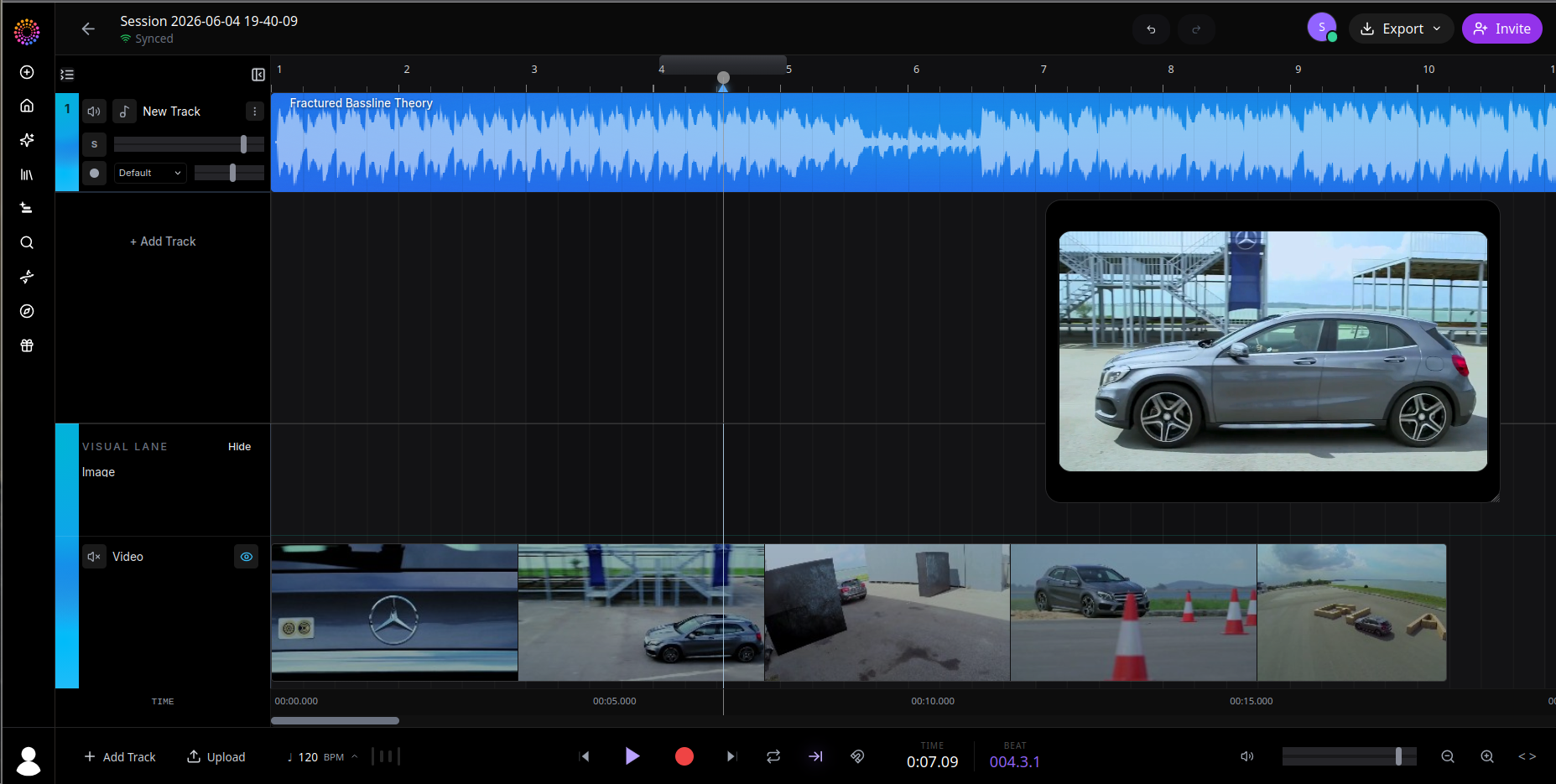
Three Ways to Bring Video Into the Session There isn't one fixed workflow for audio-visual creation in the Studio. There are three, depending on what you're starting with and where you want to end up. Import existing video. Upload a video file directly into the session. It lands on the video lane and aligns to the timeline's tempo and beat grid. From there, the audio layer is independent you can swap the music, adjust the mix, generate a completely different track that fits the pacing of your existing footage. Film editors who need a custom score have used this workflow for years in fragmented tools. In the Studio, it's one import.
Generate video inside the session. Use AI Video Generator or AI Image Generator as native tools on the canvas. Generate clips that are born beat-aligned, they know the tempo, they know the section structure, they appear on the video lane already synchronised to the audio. No manual alignment. No export and re-import. The visual is created inside the same session as the music. Generate a full music video from a finished song. Drop a completed track into the Studio, ask Agent One for a music video, and a full multi-scene video appears on the video lane beat-aligned, structured around the song's sections, with lip-sync where applicable. A process that used to require a director, an editor, and a significant budget now takes a message and a few minutes.
The Music Video Generator — What It Actually Does It's worth being specific about what happens when you ask Agent One to make a music video, because the output is meaningfully different from what most people expect when they hear "AI-generated video." Agent One runs the whole thing as a six-stage pipeline.
First it analyses — section detection, beat grid, key, tempo, lyric timestamps if vocals are present. It knows the structure of your song before it generates a single frame.
Then it plans: scene-by-scene timing, visual narrative arc, which input references influence which moments, where lip-sync targets appear.
Then it generates — AI images for static frames, AI video for motion segments, character-consistency models so the same person looks the same across multiple scenes.
Then it syncs — cuts snap to beats, scene boundaries align with section boundaries, lip-sync rendering happens wherever the singer appears on screen.
Then it exports — 9:16 for Reels and TikTok and Shorts, 1:1 for feed, 16:9 for YouTube. All from the same generation.
What you get is not a visualiser or an abstract motion background. It's a structured music video that reflects the shape of your song, sections where the energy builds have visuals that build, the chorus hits with a visual moment, the outro resolves. The music and the picture are telling the same story because the video was generated from the music, not assembled alongside it.
Export — Every Platform, One Session When you're done, the Studio's export surface handles the reality that one project ships to multiple destinations. Audio as WAV for further production. Audio as MP3 for streaming upload. Stem packages as ZIP files for DAW hand-off. Video in 9:16 for TikTok, Reels, and Shorts. Video in 1:1 for Instagram feed. Video in 16:9 for YouTube. Custom dimensions for anything that doesn't fit a standard format. Synchronised audio and video as a single file, ready to upload directly. All of this from one session. One project. One export surface. No round trips. No re-encoding. No wondering if the version you exported for TikTok is actually the same mix as the version you uploaded to Spotify. Everything comes from the same source.
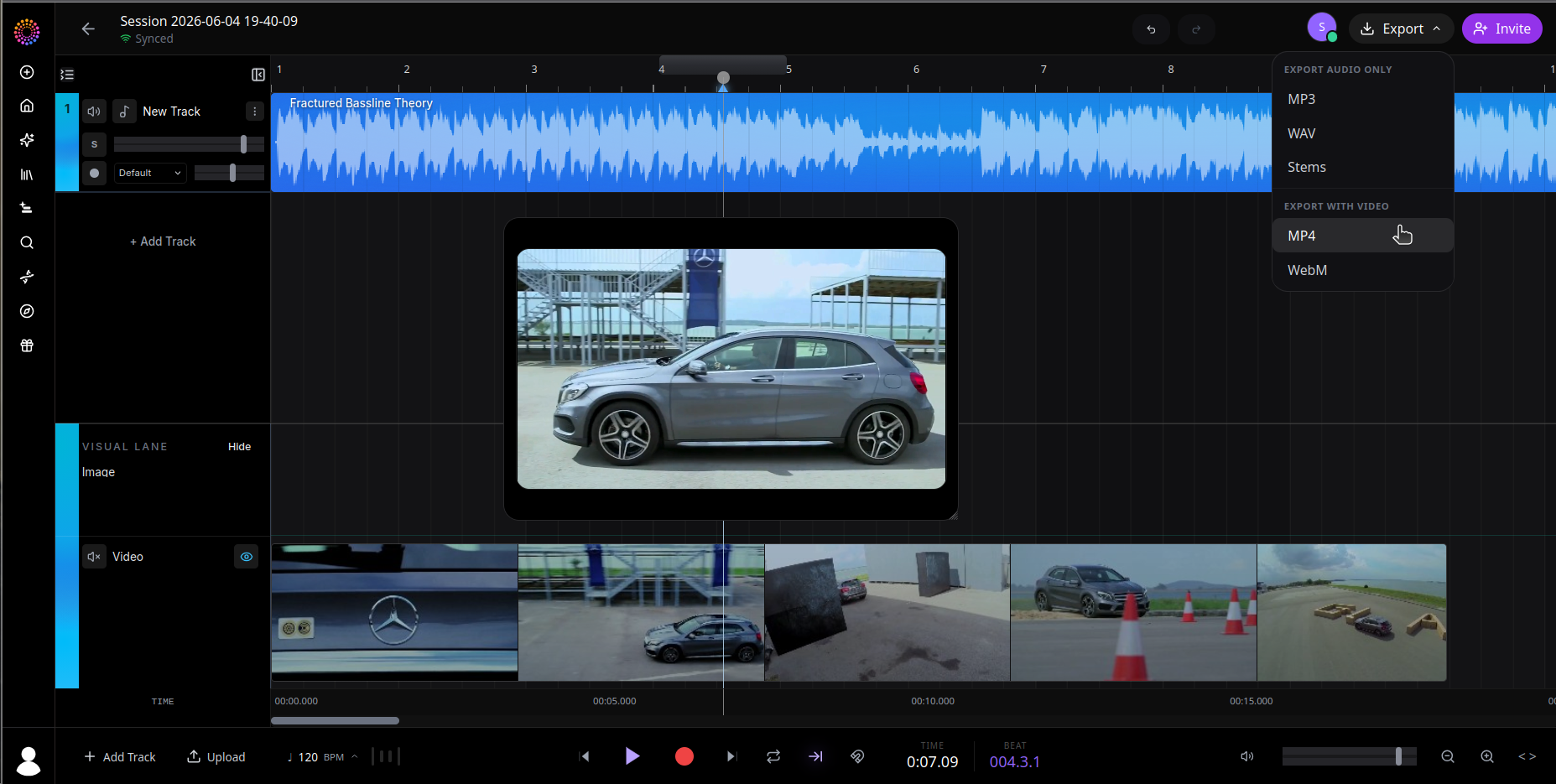
Why This Matters Right Now The convergence of music and video isn't a trend that's still arriving. It's already here. Every streaming platform has a video surface. Every social platform is audio-visual. Every artist from a teenager making their first song to a signed act building a release campaign, needs both. The tools that treat audio and video as separate workflows are asking creators to solve a coordination problem that shouldn't exist. The problem isn't hard to solve. It just requires someone to actually build the thing that treats them as one. That's what the AI Studio does. Audio and video on one timeline isn't a feature. It's the correct model for how music gets made and shared in 2026 and it's been missing from creative tools for too long.
Build your next release, audio and video together at soundverse.ai/aistudio
Social Links: Instagram: https://www.instagram.com/soundverse.ai TikTok: https://www.tiktok.com/@soundverse.ai Twitter: https://twitter.com/soundverse_ai LinkedIn: https://www.linkedin.com/company/soundverseai Youtube: https://www.youtube.com/@SoundverseAI Facebook: https://www.facebook.com/profile.php?id=100095674445607
Join Soundverse for Free and make Viral AI Music
